HIP Image FX
GPU image filters on AMD HIP, with autotuning that picks kernel launch configurations by measuring them.
Highlights
- GPU-accelerated filters on AMD HIP with a CPU fallback
- Autotuning picks kernel launch configurations by measuring them (12-18% over fixed defaults)
- CLI supports single images and full directory batch processing
- Benchmarks documented (GPU vs CPU, including OpenMP)
Overview #
HIP Image FX applies fast image filters (grayscale, negative, Gaussian blur) on AMD GPUs, with a CPU fallback for portability. The CLI supports both single-image and batch directory processing. An autotuning system discovers good kernel configurations for the GPU it is running on by measuring them, rather than relying on fixed defaults.
Problem statement: what are we trying to solve? #
This project began as a practical GPU programming challenge: process real images quickly on AMD hardware, but keep the tool useful even when a GPU is unavailable. The core problem is not only writing kernels. The real engineering challenge is balancing compute speed, memory transfer overhead, and ease of use in one command-line workflow.
The target outcome is a reliable image-processing tool that can run the same filters on both HIP and CPU paths, handle single files and large directories, and make performance behavior measurable across resolutions and batch sizes. The goal is to understand when GPU acceleration is truly beneficial, where it is limited by transfer cost, and how to tune execution safely without forcing users to hand-configure low-level parameters.
Problem / approach #
- Accelerate common image filters on GPUs while maintaining CPU fallback compatibility.
- Provide simple CLI interface for filter selection and I/O configuration.
- Investigate when GPU acceleration is worthwhile vs CPU for different filter types.
Prerequisites #
- AMD ROCm stack (HIP)
- OpenMP for the CPU path
- Meson build system
Solution #
- HIP kernels for each filter with a
--use-cpufallback option. - Meson build system targeting ROCm with HIP toolchain.
- Flexible CLI supporting single images and batch directory processing.
- Autotuning that picks kernel launch configurations by measuring them.
Autotuning Framework #
The autotuning system automatically finds the fastest GPU kernel configuration for your hardware through empirical benchmarking:
# First run: autotuning (~100-200ms overhead)
./build/hip-img-fx --input photo.jpg --output result.jpg --filter grayscale
# Output: [AutoTune] Benchmarking... Selected [16x8] (0.034ms)

# Subsequent runs: cached configuration (zero overhead)
./build/hip-img-fx --input photo.jpg --output result.jpg --filter grayscale
# Output: [AutoTune] Using cached [16x8]
Key Features:
- Zero-configuration optimization: Tests 15-30 block size configurations automatically
- Performance impact: 12-18% faster than default configurations
- Three-tier caching: Thread-local → Persistent JSON → Benchmarking (only on cache miss)
- Embedded defaults: Known-good configurations for common GPUs, with compile-time safety via C++20 concepts
- GPU-aware: Separate optimal configurations per architecture (gfx1030, gfx1100, etc.)
The framework handles all tuning transparently, with no code changes needed. For custom kernels, a comprehensive API enables integration with minimal boilerplate.
Build & run #
- Configure:
meson setup build --native-file native/hip.ini --reconfigure - Compile:
ninja -C build - Single image:
./build/hip-img-fx --input input.jpg --filter grayscale --output output.jpg - Batch:
./build/hip-img-fx --input examples --filter grayscale --output examples/output - Filters:
grayscale,negative,gaussian-blur
CLI help excerpt #
hip-img-fx --help shows options for input/output (file or dir), filter selection, --use-cpu, and notes on batch vs single-image modes.
./build/hip-img-fx --help
============================
Running HIP Image FX v1.0.0
============================

Usage: hip-img-fx [options]
Options:
  --input <input_file|input_dir>     Specifies the input file or directory path.
  --output <output_file|output_dir>  Specifies the output file or directory path.
  --filter <filter_type>             Specifies the type of filter to apply
                                     (e.g., "grayscale", "negative", "gaussian-blur").
  --use-cpu                          Use CPU for processing instead of GPU.
  --batch-size <N>                   Number of images to process per GPU batch (default: 64).
  --help                             Displays this help information.

Notes:
  - For batch processing, specify both --input and --output as directories.
  - For single image processing, specify both as files.
  - Supported filters: grayscale, negative, gaussian-blur
Example run/output (GPU batch) #
============================
Running HIP Image FX v1.0.0
============================
Input: /home/avic/Pictures/train/
Output: /home/avic/Pictures/train_output
Filter Type: GRAYSCALE
Batch Size: 64
Using GPU for processing.
    HIP Device Count: 1
    Device 0: AMD Radeon RX 6900 XT
        Compute Capability: ------------ = 10.3
        Total Global Memory: ----------- = 17163091968
        Shared Memory per Block: ------- = 65536
        Registers per Block: ----------- = 32768
        Warp Size: --------------------- = 32
        Max Threads per Block: --------- = 1024
        Max Threads Dimension: --------- = (1024, 1024, 1024)
        Max Grid Size: ----------------- = (2147483647, 65536, 65536)
        Clock Rate: -------------------- = 2660000
        Total Constant Memory: --------- = 2147483647
        Multiprocessor Count: ---------- = 40
        L2 Cache Size: ----------------- = 4194304
        Max Threads per Multiprocessor:  = 2048
        Unified Addressing: ------------ = 0
        Memory Clock Rate: ------------- = 1000000
        Memory Bus Width: -------------- = 256
        Peak Memory Bandwidth: --------- = 64.000000

num threads: 32
GPU batch size: 64
Loaded 6499 images for batch processing.
[AutoTuner] Loaded 9 embedded default configurations
Batch processing complete: 6499 images processed.
Total processing time: 00m 01s 420ms
Project structure #
hip-img-fx/
├── src/
│   ├── app/                    # Application entry point & batch processing
│   ├── cli/                    # Command-line argument parsing
│   ├── core/                   # GPU utilities, timing, image I/O
│   │   ├── gpu_utils.cpp/.h    # HIP pipeline, events, streams
│   │   └── image.cpp/.h        # STB-based image loading
│   └── filters/                # HIP kernels & CPU implementations
│       ├── grayscale.hip.cpp
│       ├── negative.hip.cpp
│       └── gaussian_blur.hip.cpp
├── bench/
│   ├── run_bench.cpp           # Benchmark harness
│   ├── scripts/
│   │   ├── run_benchmark.sh    # Automated benchmark runner
│   │   └── analyze_results.py  # Performance analysis tool
│   └── results/                # CSV output directory
├── examples/                   # Sample images
├── native/
│   └── hip.ini                 # Meson HIP configuration
└── meson.build                 # Build system
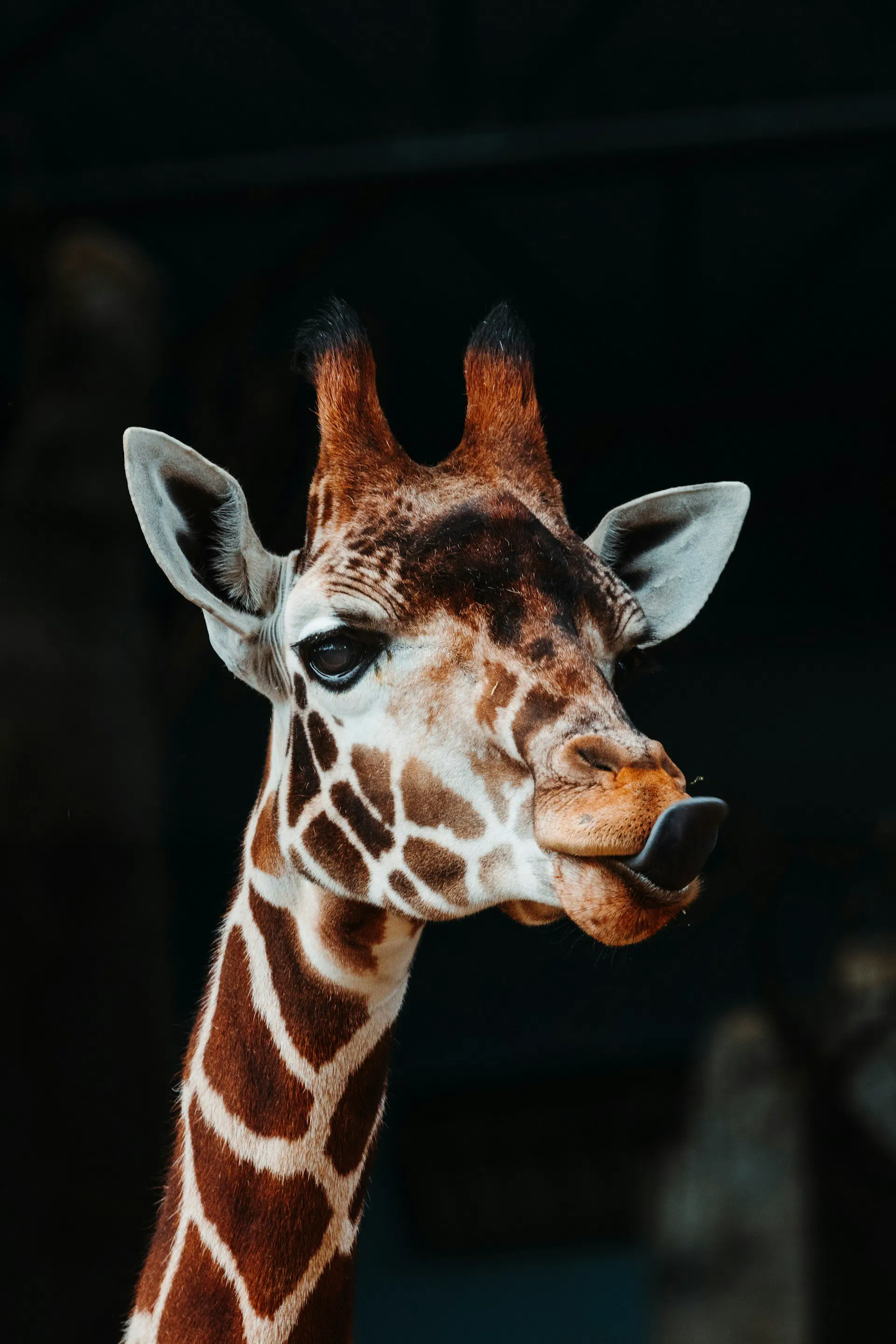
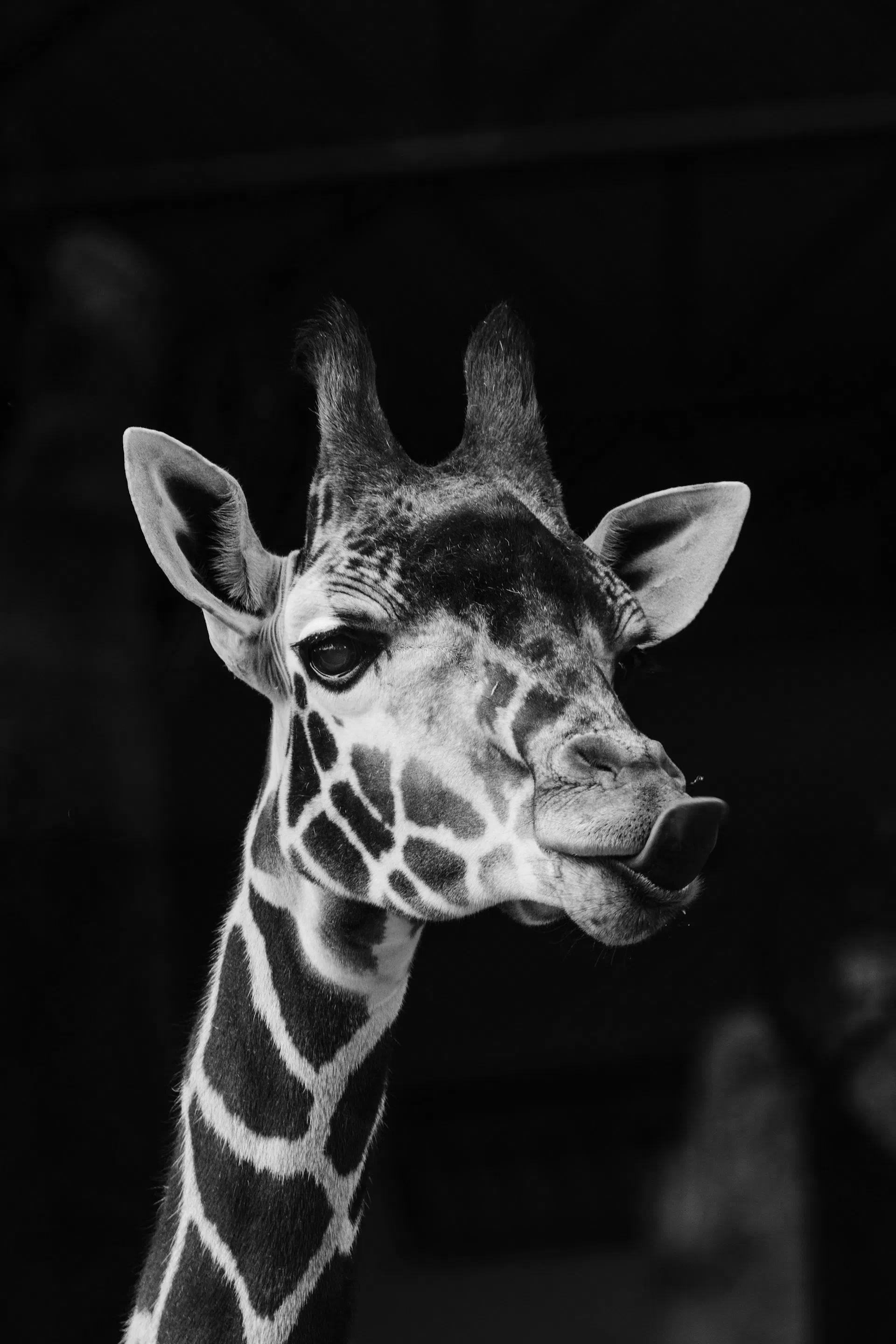
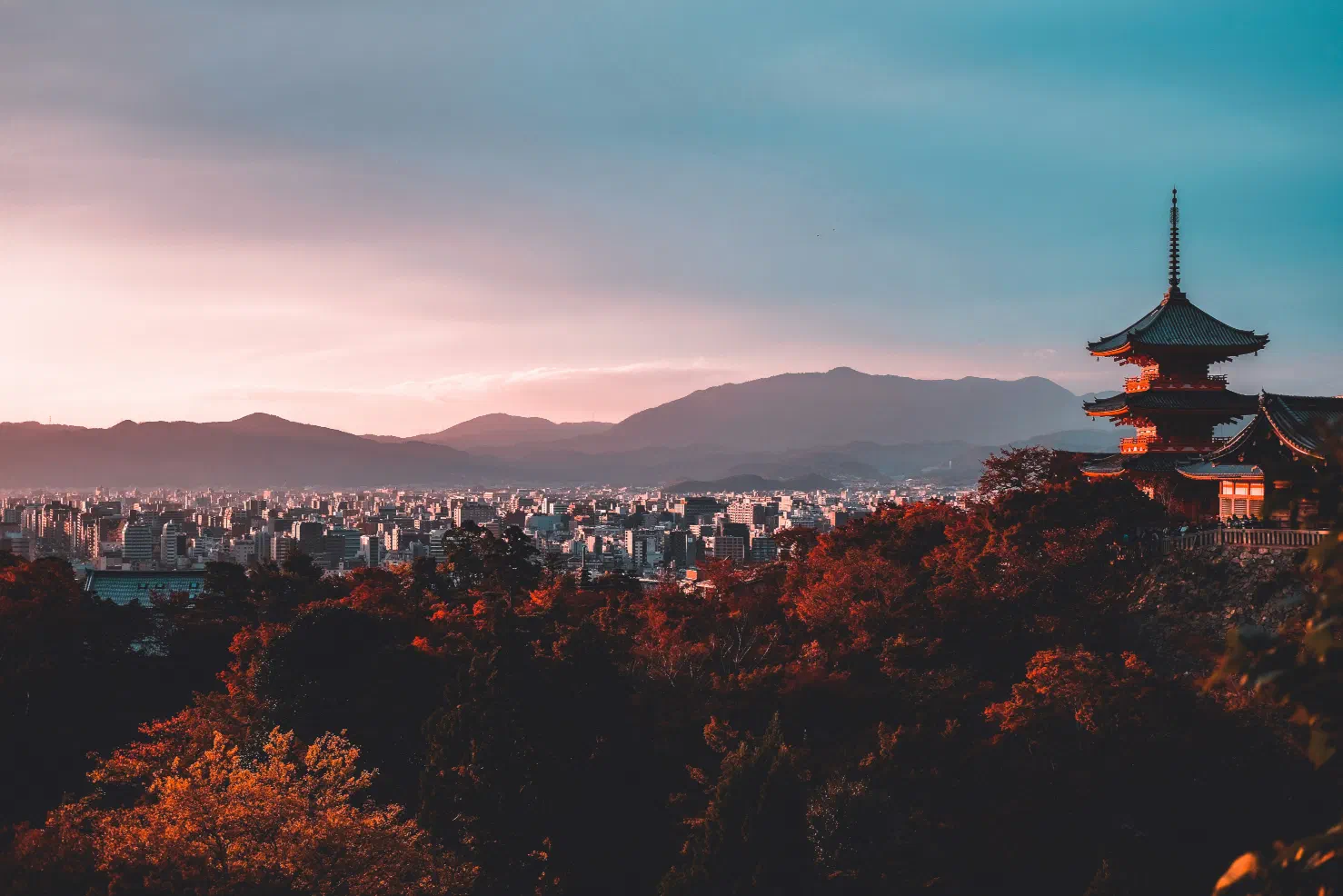
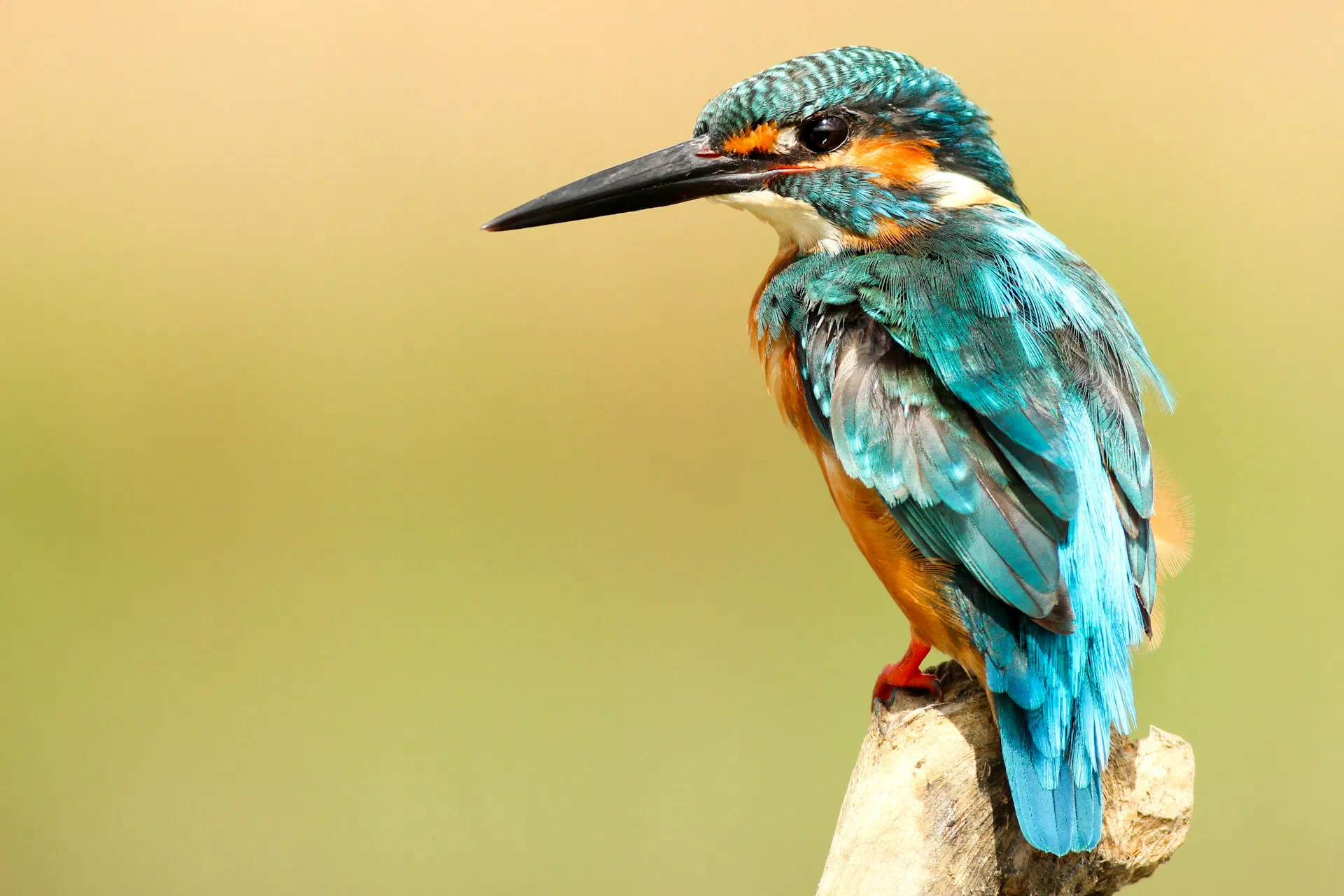
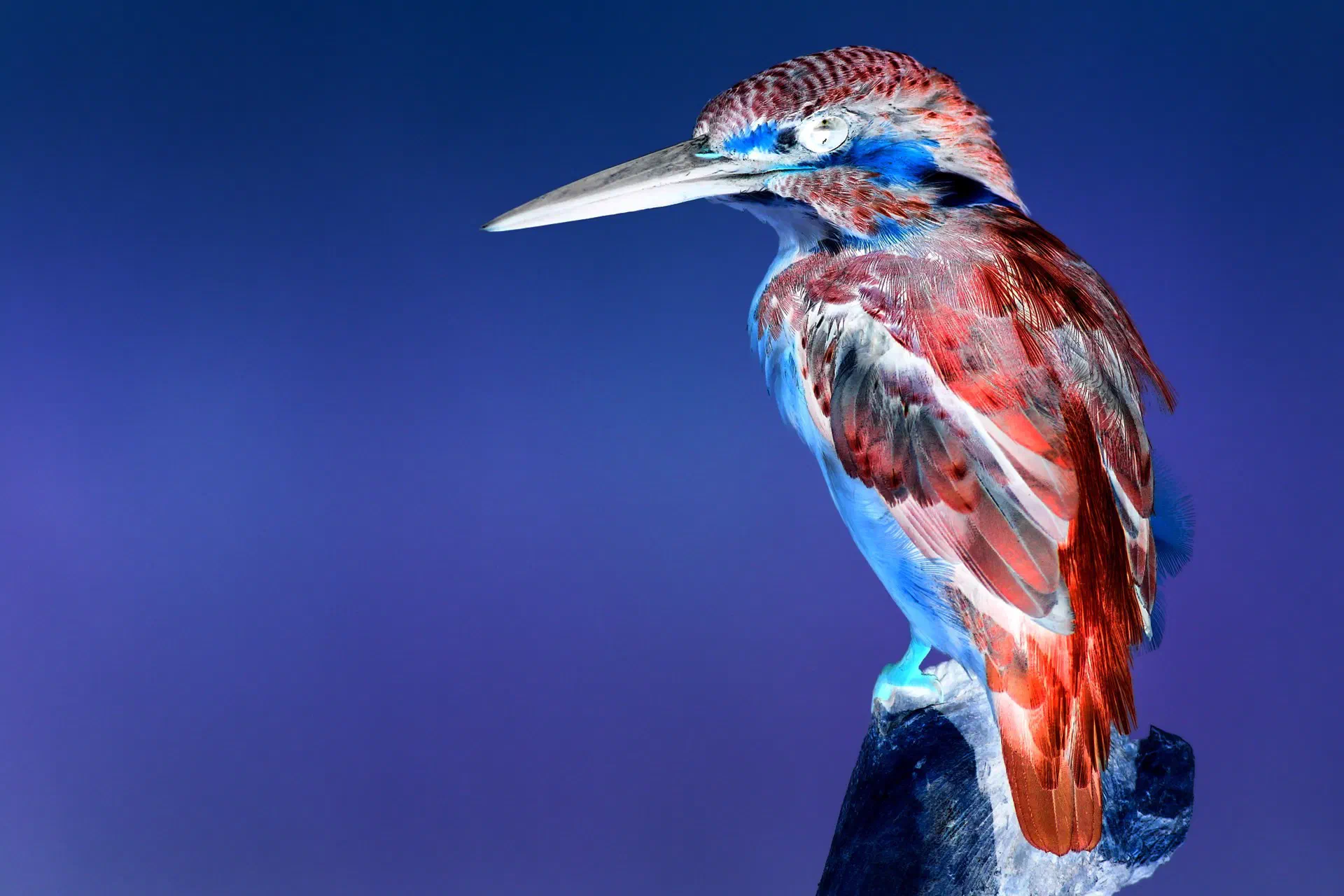
Filter examples (before → after) #
Grayscale
Gaussian blur
Negative
Test System #
- GPU: AMD Radeon RX 6900 XT (gfx1030)
- CPU: AMD Ryzen 3950X (32 threads OpenMP)
- HIP toolchain: hipcc (ROCm clang 19.0)
Benchmark (Jan 2026) #
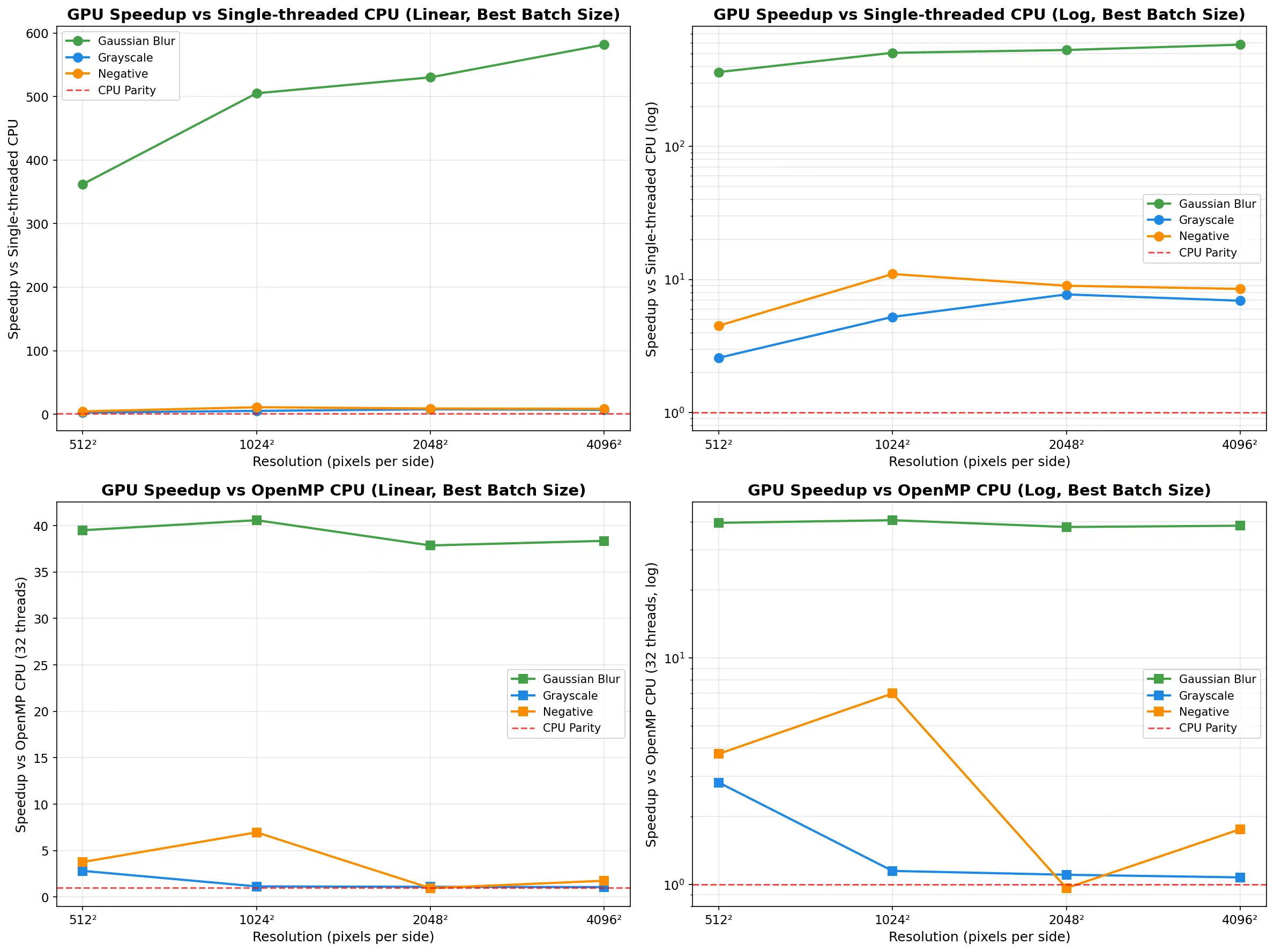
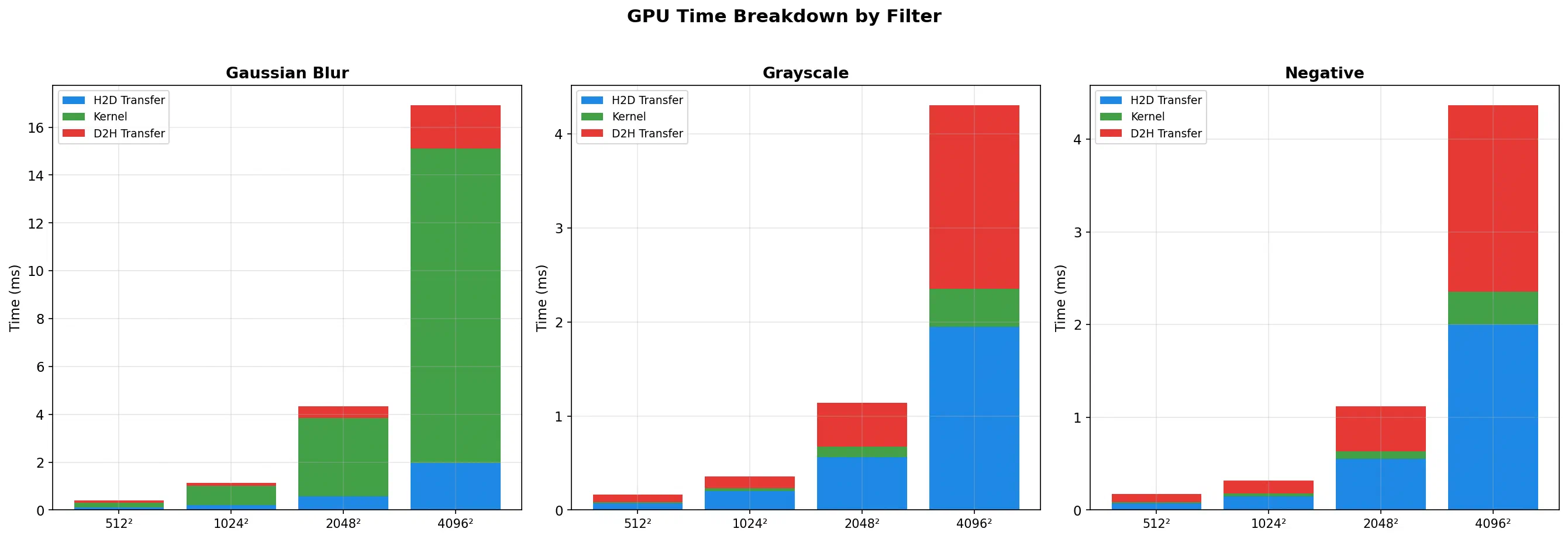
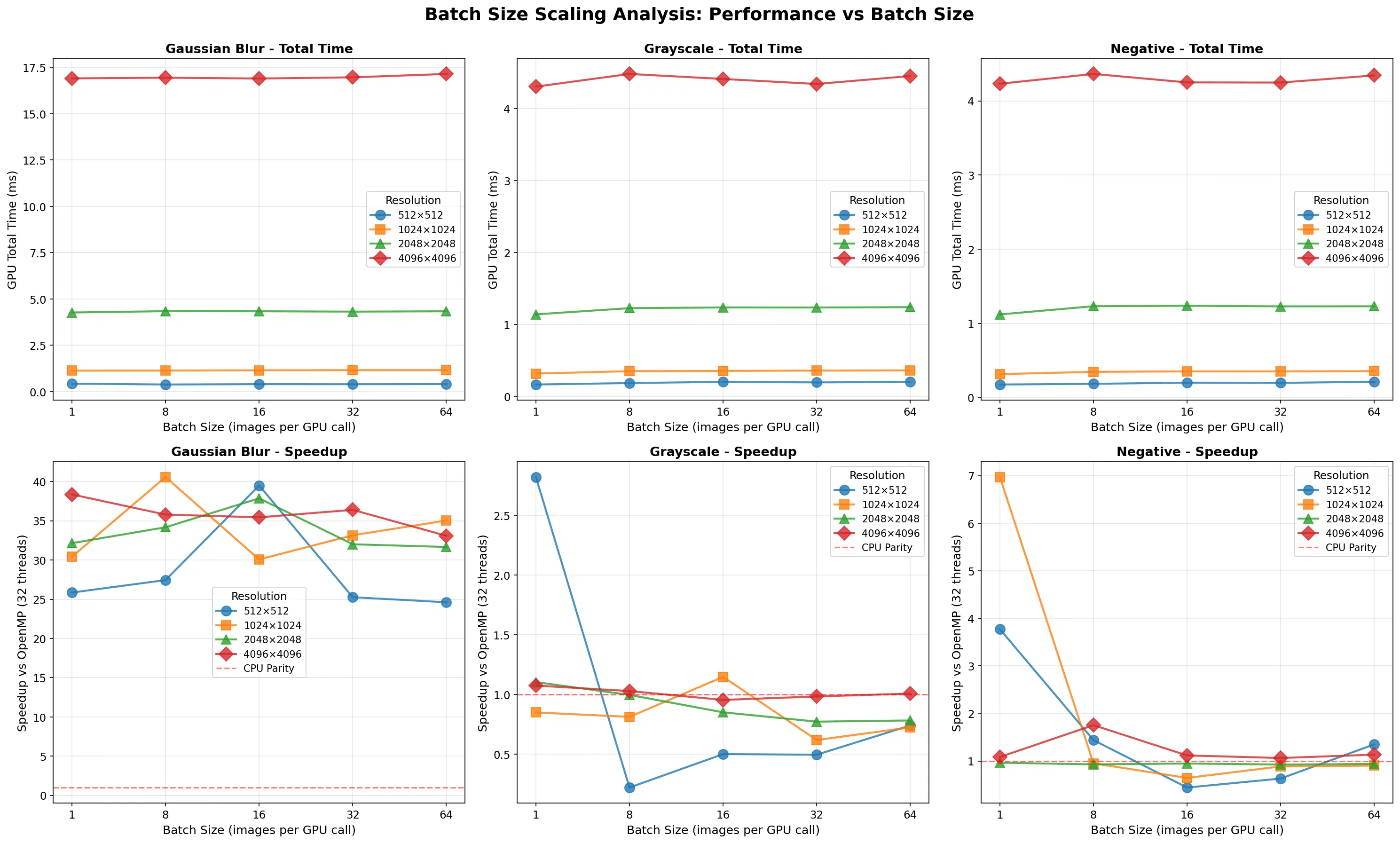
Benchmarks use a synchronous pipeline (H2D → kernel → D2H) across 3 filters, 4 resolutions (512² → 4096²), and 5 batch sizes (1/8/16/32/64).
Key Results #
- Peak speedup vs OpenMP: 41× (Gaussian blur, 1024², batch 8)
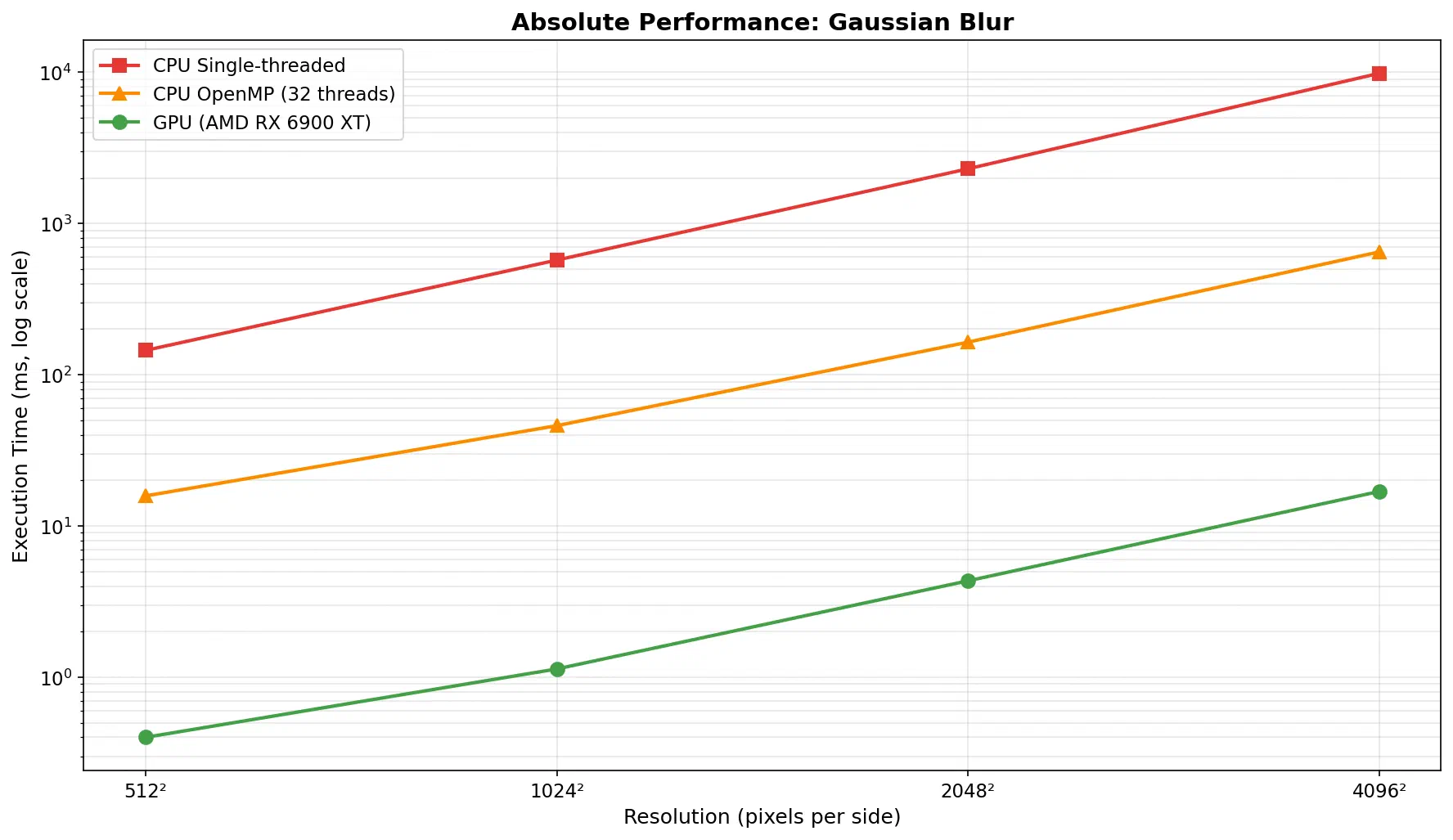
- Peak speedup vs single-thread CPU: 582× (Gaussian blur, 4096²)
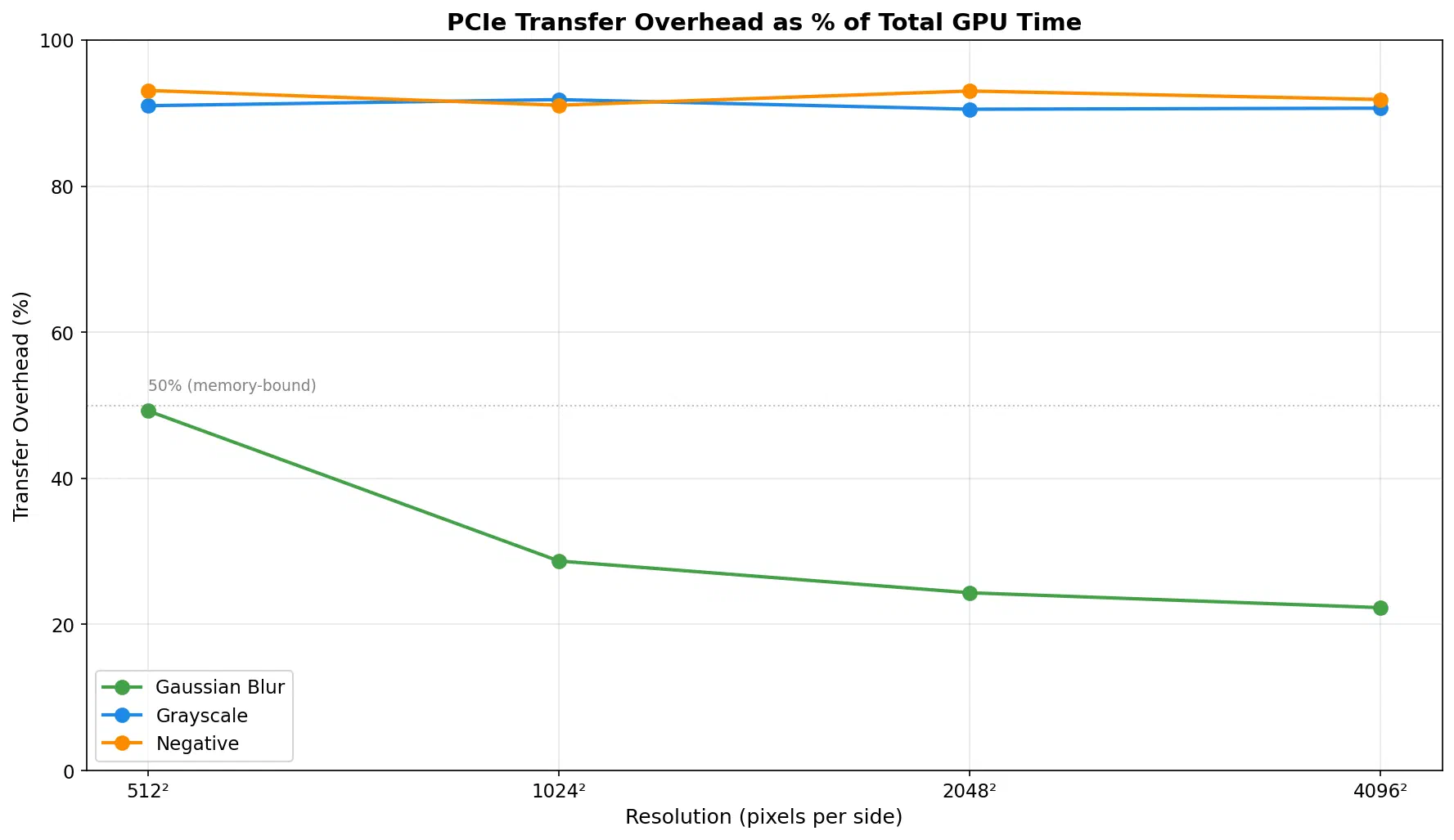
- Average transfer overhead: ~72% of total GPU time
- Compute-bound workload: Gaussian blur achieves 25-41× vs OpenMP with 22-29% transfer overhead
- Memory-bound workloads: Grayscale/negative show 89-97% transfer overhead, often near parity with OpenMP (0.2-7× speedup)
Performance Analysis #
Performance by Filter #
Gaussian Blur (Compute-Intensive) #
| Resolution | Batch Size | GPU Time | Kernel Time | Transfer % | Speedup vs OpenMP | Speedup vs CPU |
|---|---|---|---|---|---|---|
| 512² | 1 | 0.426 ms | 0.217 ms | 49.0% | 25.85× | 358.29× |
| 512² | 8 | 0.381 ms | 0.204 ms | 46.5% | 27.45× | 385.88× |
| 512² | 16 | 0.400 ms | 0.202 ms | 49.5% | 39.50× | 361.94× |
| 512² | 32 | 0.396 ms | 0.202 ms | 49.0% | 25.26× | 352.83× |
| 512² | 64 | 0.403 ms | 0.204 ms | 49.4% | 24.62× | 363.66× |
| 1024² | 1 | 1.129 ms | 0.824 ms | 27.0% | 30.42× | 501.63× |
| 1024² | 8 | 1.133 ms | 0.808 ms | 28.7% | 40.59× | 505.09× |
| 1024² | 16 | 1.149 ms | 0.821 ms | 28.5% | 30.08× | 495.33× |
| 1024² | 32 | 1.154 ms | 0.820 ms | 29.0% | 33.16× | 494.37× |
| 1024² | 64 | 1.156 ms | 0.823 ms | 28.8% | 35.04× | 498.23× |
| 2048² | 1 | 4.269 ms | 3.217 ms | 24.7% | 32.15× | 529.63× |
| 2048² | 8 | 4.340 ms | 3.295 ms | 24.1% | 34.18× | 531.13× |
| 2048² | 16 | 4.335 ms | 3.279 ms | 24.4% | 37.87× | 530.14× |
| 2048² | 32 | 4.315 ms | 3.285 ms | 23.9% | 32.01× | 520.04× |
| 2048² | 64 | 4.335 ms | 3.301 ms | 23.9% | 31.66× | 529.82× |
| 4096² | 1 | 16.910 ms | 13.139 ms | 22.3% | 38.36× | 581.63× |
| 4096² | 8 | 16.947 ms | 13.133 ms | 22.5% | 35.79× | 579.58× |
| 4096² | 16 | 16.902 ms | 13.145 ms | 22.2% | 35.44× | 576.04× |
| 4096² | 32 | 16.967 ms | 13.212 ms | 22.1% | 36.40× | 575.91× |
| 4096² | 64 | 17.149 ms | 13.370 ms | 22.0% | 33.09× | 572.22× |
Gaussian Blur Performance Data
Analysis: Gaussian blur is the ideal GPU workload. The 11×11 convolution kernel (121 operations per pixel) provides sufficient compute intensity to amortize transfer costs. Transfer overhead decreases from ~49% to ~22% as resolution increases. Speedup remains excellent (25-41× vs OpenMP) across all tested resolutions and batch sizes, with peak performance at 1024² (batch 8: 40.6× vs OpenMP, 505× vs single-thread CPU).
Grayscale (Memory-Bound) #
| Resolution | Batch Size | GPU Time | Kernel Time | Transfer % | Speedup vs OpenMP | Speedup vs CPU |
|---|---|---|---|---|---|---|
| 512² | 1 | 0.167 ms | 0.014 ms | 91.6% | 2.82× | 2.58× |
| 512² | 8 | 0.187 ms | 0.008 ms | 95.7% | 0.22× | 4.06× |
| 512² | 16 | 0.204 ms | 0.007 ms | 96.6% | 0.50× | 2.76× |
| 512² | 32 | 0.196 ms | 0.006 ms | 96.9% | 0.50× | 2.34× |
| 512² | 64 | 0.204 ms | 0.007 ms | 96.6% | 0.74× | 2.09× |
| 1024² | 1 | 0.319 ms | 0.036 ms | 88.7% | 0.85× | 10.36× |
| 1024² | 8 | 0.352 ms | 0.025 ms | 92.9% | 0.81× | 5.42× |
| 1024² | 16 | 0.356 ms | 0.029 ms | 91.9% | 1.15× | 5.24× |
| 1024² | 32 | 0.360 ms | 0.031 ms | 91.4% | 0.62× | 5.30× |
| 1024² | 64 | 0.363 ms | 0.031 ms | 91.5% | 0.72× | 4.90× |
| 2048² | 1 | 1.141 ms | 0.108 ms | 90.5% | 1.10× | 7.73× |
| 2048² | 8 | 1.227 ms | 0.123 ms | 90.0% | 1.00× | 6.15× |
| 2048² | 16 | 1.237 ms | 0.122 ms | 90.1% | 0.85× | 5.90× |
| 2048² | 32 | 1.236 ms | 0.122 ms | 90.1% | 0.77× | 5.85× |
| 2048² | 64 | 1.241 ms | 0.123 ms | 90.1% | 0.78× | 6.13× |
| 4096² | 1 | 4.303 ms | 0.401 ms | 90.7% | 1.07× | 6.93× |
| 4096² | 8 | 4.479 ms | 0.487 ms | 89.1% | 1.03× | 6.60× |
| 4096² | 16 | 4.409 ms | 0.484 ms | 89.0% | 0.95× | 6.56× |
| 4096² | 32 | 4.340 ms | 0.483 ms | 88.9% | 0.98× | 6.63× |
| 4096² | 64 | 4.450 ms | 0.491 ms | 89.0% | 1.01× | 6.62× |
Grayscale Performance Data
Analysis: Grayscale conversion is severely memory-bound. Kernel execution stays under ~0.49ms even for 4096² images, while transfers dominate (typically 89-97% overhead). Performance is inconsistent across batch sizes, with many configurations showing CPU OpenMP beating GPU (speedup < 1×). Best case: 2.82× vs OpenMP at 512² batch 1. Worst case: 0.22× at 512² batch 8.
Negative (Memory-Bound) #
| Resolution | Batch Size | GPU Time | Kernel Time | Transfer % | Speedup vs OpenMP | Speedup vs CPU |
|---|---|---|---|---|---|---|
| 512² | 1 | 0.174 ms | 0.013 ms | 92.5% | 3.77× | 4.50× |
| 512² | 8 | 0.183 ms | 0.006 ms | 96.7% | 1.44× | 4.31× |
| 512² | 16 | 0.199 ms | 0.005 ms | 97.5% | 0.44× | 3.99× |
| 512² | 32 | 0.196 ms | 0.005 ms | 97.4% | 0.63× | 2.83× |
| 512² | 64 | 0.211 ms | 0.005 ms | 97.6% | 1.35× | 2.75× |
| 1024² | 1 | 0.314 ms | 0.029 ms | 90.8% | 6.97× | 10.99× |
| 1024² | 8 | 0.345 ms | 0.018 ms | 94.8% | 0.95× | 7.29× |
| 1024² | 16 | 0.351 ms | 0.021 ms | 94.0% | 0.64× | 6.58× |
| 1024² | 32 | 0.351 ms | 0.021 ms | 94.0% | 0.89× | 6.44× |
| 1024² | 64 | 0.354 ms | 0.021 ms | 94.1% | 0.90× | 6.34× |
| 2048² | 1 | 1.119 ms | 0.078 ms | 93.0% | 0.96× | 8.97× |
| 2048² | 8 | 1.230 ms | 0.087 ms | 92.9% | 0.93× | 7.52× |
| 2048² | 16 | 1.236 ms | 0.090 ms | 92.7% | 0.95× | 7.41× |
| 2048² | 32 | 1.228 ms | 0.090 ms | 92.7% | 0.93× | 7.21× |
| 2048² | 64 | 1.229 ms | 0.091 ms | 92.6% | 0.94× | 7.38× |
| 4096² | 1 | 4.231 ms | 0.297 ms | 93.0% | 1.08× | 8.55× |
| 4096² | 8 | 4.363 ms | 0.355 ms | 91.9% | 1.75× | 8.50× |
| 4096² | 16 | 4.249 ms | 0.356 ms | 91.6% | 1.12× | 8.30× |
| 4096² | 32 | 4.247 ms | 0.357 ms | 91.6% | 1.06× | 8.35× |
| 4096² | 64 | 4.343 ms | 0.363 ms | 91.6% | 1.13× | 8.19× |
Negative Filter Performance Data
Analysis: Similar to grayscale, negative inversion is memory-bound with ~91-98% transfer overhead. The simple per-byte operation executes in well under 0.36ms even at 4096², so transfer dominates. Performance is frequently near parity with CPU OpenMP; best case: 6.97× at 1024² batch 1. Worst case: 0.44× at 512² batch 16.
Key Takeaways #
Compute-Bound vs Memory-Bound Performance
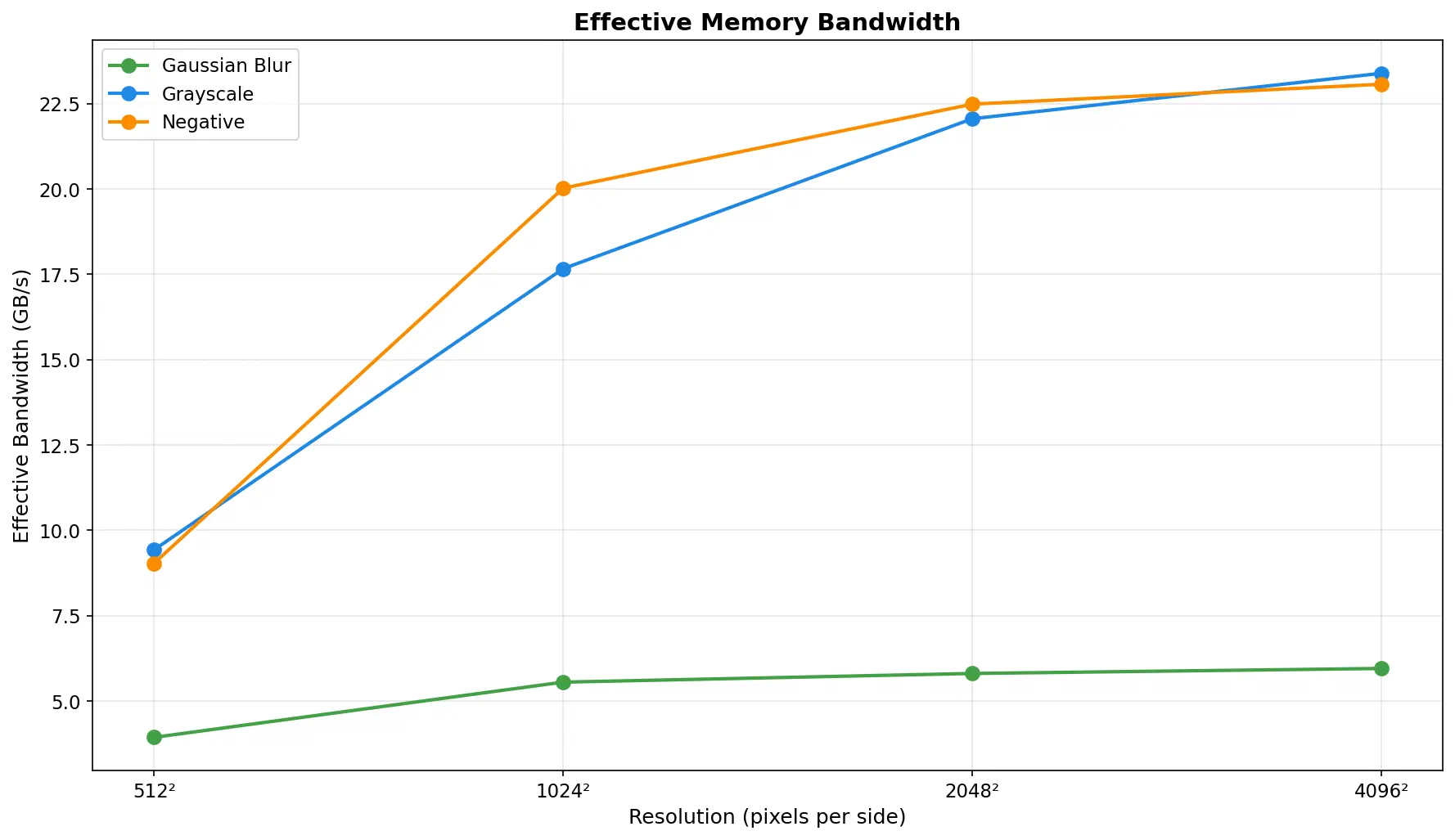
Gaussian blur (O(n² × kernel_size²)) demonstrates when GPU acceleration excels: sufficient compute intensity to amortize transfer costs, achieving 25-41× vs OpenMP and up to 582× vs single-thread CPU. Grayscale and negative reveal the limitation: simple per-pixel operations (0.22-6.97× vs OpenMP) where PCIe transfers consume 89-98% of GPU time.
Batch Processing Impact
Extensive testing across 5 batch sizes (1/8/16/32/64) reveals:
- Compute-bound filters: Minimal impact (~2-5% variation), batch 8 often optimal
- Memory-bound filters: Significant variability as transfer overhead shifts, smaller batches (1-8) often better
- Single large allocation: Amortizes some overhead but doesn’t overcome fundamental memory-bound limitations
- Optimal batch size: Highly dependent on filter complexity, resolution, and GPU architecture
Resolution Scaling
As resolution increases, kernel execution grows quadratically while transfer overhead (as percentage) decreases. This makes GPU acceleration increasingly attractive for larger images, particularly for compute-intensive operations. At 4096², even memory-bound filters show 6-9× speedup vs single-thread CPU, though they remain slower than OpenMP.
Autotuning System
The autotuner shows that kernel configuration matters: measured runs come out 12-18% faster than fixed defaults. The three-tier caching system (thread-local → persistent JSON → benchmarking) ensures optimal performance with zero overhead after first run.
Learning Outcomes #
This project demonstrates:
HIP Fundamentals
- Kernel launch configuration (
hipLaunchKernelGGL) - Memory management (
hipMalloc,hipMemcpy) - Event-based profiling (
hipEventRecord,hipEventElapsedTime) - Batch processing with contiguous memory allocation
- Kernel launch configuration (
GPU Performance Engineering
- Identifying memory-bound vs compute-bound kernels
- Analyzing bandwidth utilization
- Optimizing memory access patterns (coalescing)
- Understanding when GPU acceleration is beneficial vs CPU
- Batch size tuning for different workload characteristics
- Empirical autotuning for optimal kernel configurations
Production Engineering Practices
- Reproducible benchmark infrastructure
- Statistical analysis (mean, std dev)
- Performance regression detection
- Clear documentation of optimization tradeoffs
- Data-driven architectural decisions
- Self-optimizing systems through autotuning frameworks
- Compile-time safety with C++20 concepts
Future Work #
High-Priority Optimizations #
Separable Gaussian Blur (3-5× speedup expected)
- Split 11×11 2D convolution into 2× 11×1 passes
- Reduces memory reads from 121 to 22 per pixel
Tile-Based Processing with Shared Memory
- Load image tiles into shared memory
- Reuse data across threads
- Reduces global memory pressure
Multi-GPU Support
- Distribute workload across multiple GPUs
- Peer-to-peer transfers between GPUs
Half-Precision (FP16) Kernels
- Use RDNA matrix acceleration
- 2× throughput for blur operations
Research Directions #
- Warp-level primitives: Use shuffle intrinsics for reduction operations
- Texture memory: Test performance with texture cache for blur operations
- Async Streams: Overlap H2D/kernel/D2H using HIP streams (requires careful benchmarking)
Credits #
Example images (unsplash.com):