Project
HIP Image FX
GPU-accelerated image processing framework with production-ready autotuning for optimal kernel configurations.
Role
GPU Compute
Date
11-01-2026
Tech
HIPOpenMPMesonROCm
Project
GPU-accelerated image processing framework with production-ready autotuning for optimal kernel configurations.
GPU Compute
11-01-2026
Highlights
HIP Image FX applies fast image filters (grayscale, negative, Gaussian blur) on AMD GPUs, with a CPU fallback for portability. The CLI supports both single-image and batch directory processing. The framework features a production-ready autotuning system that automatically discovers optimal kernel configurations for your specific GPU through empirical measurement. l
This project began as a practical GPU programming challenge: process real images quickly on AMD hardware, but keep the tool useful even when a GPU is unavailable. The core problem is not only writing kernels. The real engineering challenge is balancing compute speed, memory transfer overhead, and ease of use in one command-line workflow.
The target outcome is a reliable image-processing tool that can run the same filters on both HIP and CPU paths, handle single files and large directories, and make performance behavior measurable across resolutions and batch sizes. The goal is to understand when GPU acceleration is truly beneficial, where it is limited by transfer cost, and how to tune execution safely without forcing users to hand-configure low-level parameters.
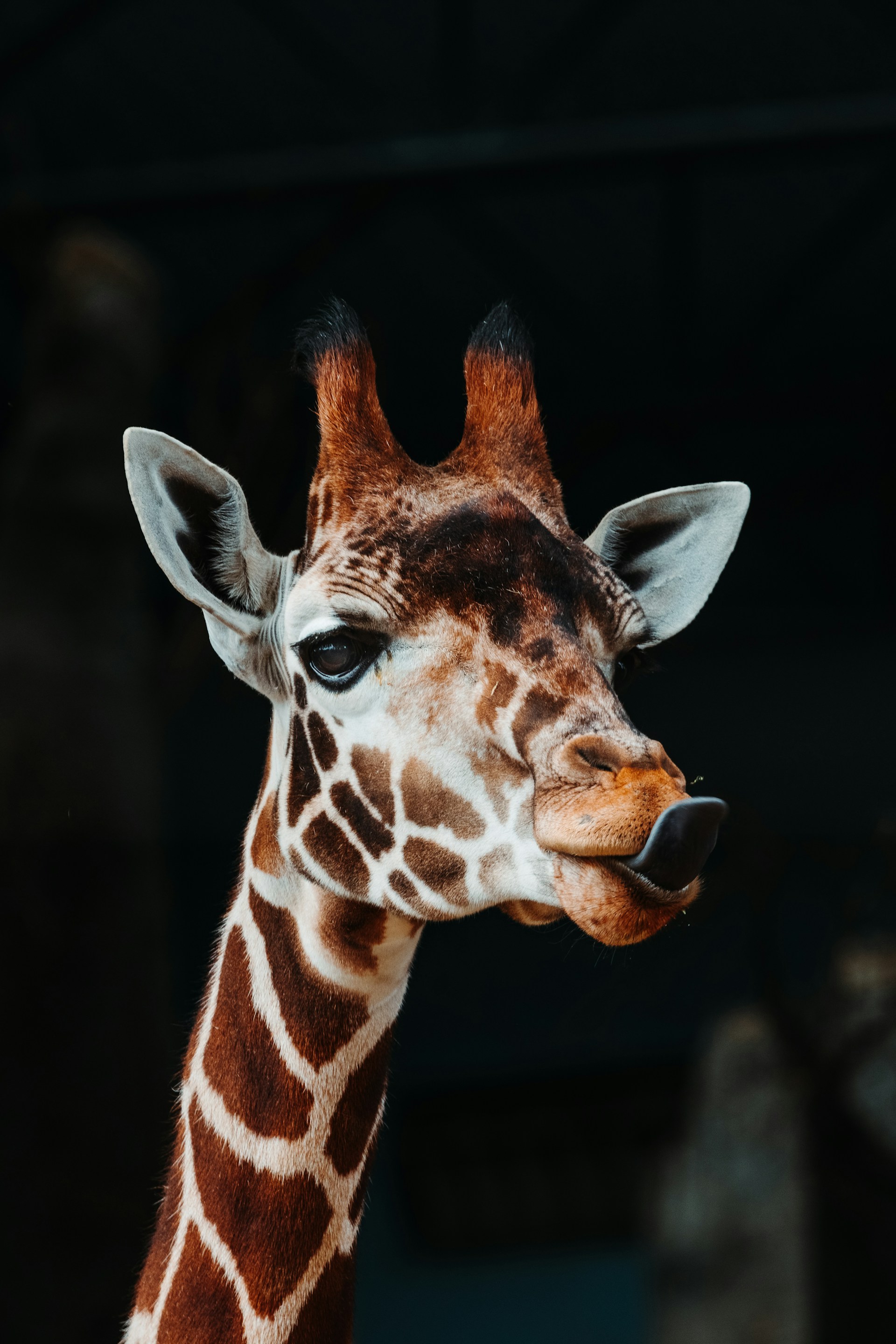
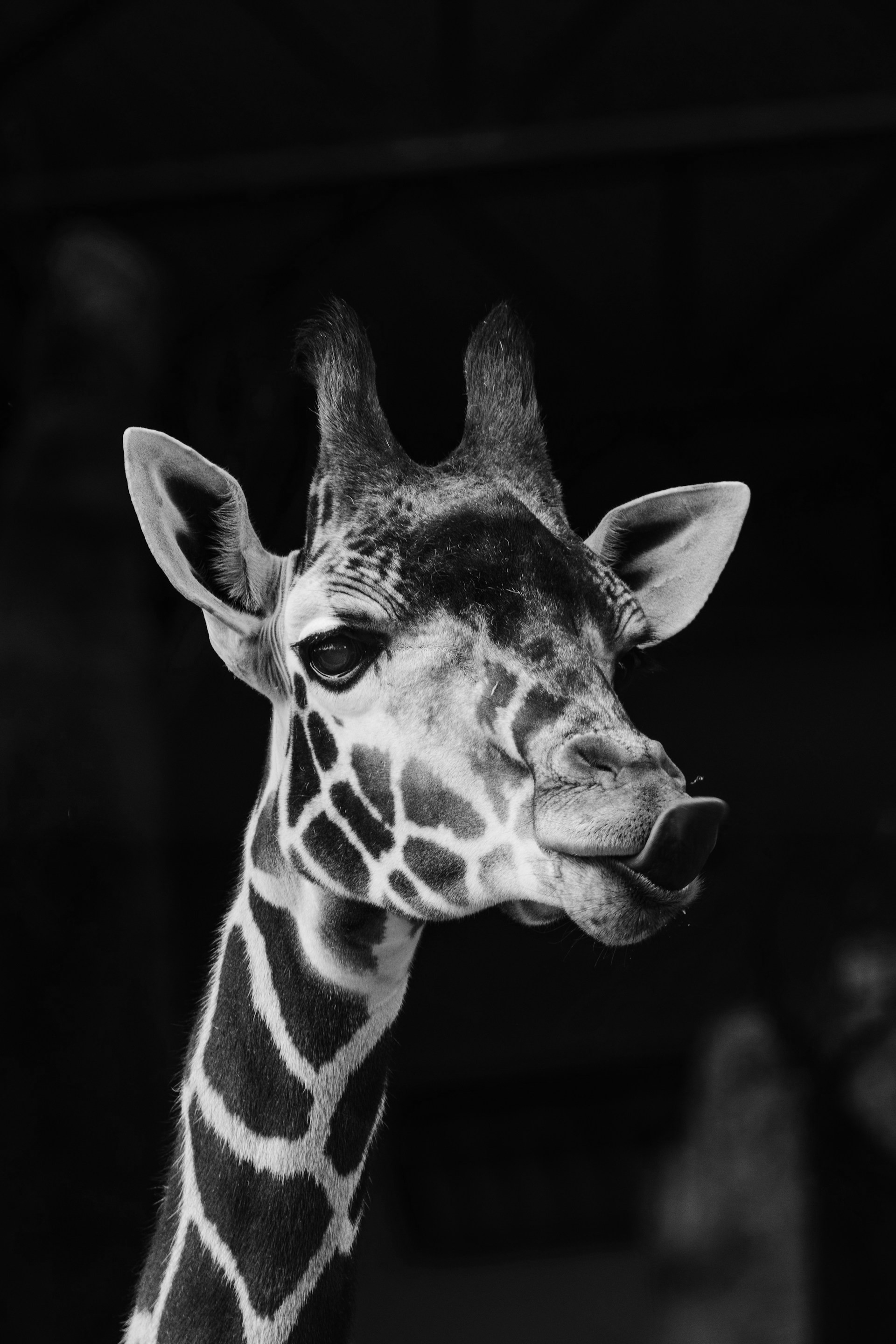
--use-cpu fallback option.The autotuning system automatically finds the fastest GPU kernel configuration for your hardware through empirical benchmarking:
# First run: autotuning (~100-200ms overhead)
./build/hip-img-fx --input photo.jpg --output result.jpg --filter grayscale
# Output: [AutoTune] Benchmarking... Selected [16x8] (0.034ms)

# Subsequent runs: cached configuration (zero overhead)
./build/hip-img-fx --input photo.jpg --output result.jpg --filter grayscale
# Output: [AutoTune] Using cached [16x8]
Key Features:
The framework handles all tuning transparently, with no code changes needed. For custom kernels, a comprehensive API enables integration with minimal boilerplate.
meson setup build --native-file native/hip.ini --reconfigureninja -C build./build/hip-img-fx --input input.jpg --filter grayscale --output output.jpg./build/hip-img-fx --input examples --filter grayscale --output examples/outputgrayscale, negative, gaussian-blurhip-img-fx --help shows options for input/output (file or dir), filter selection, --use-cpu, and notes on batch vs single-image modes.
./build/hip-img-fx --help
============================
Running HIP Image FX v1.0.0
============================

Usage: hip-img-fx [options]
Options:
  --input <input_file|input_dir>     Specifies the input file or directory path.
  --output <output_file|output_dir>  Specifies the output file or directory path.
  --filter <filter_type>             Specifies the type of filter to apply
                                     (e.g., "grayscale", "negative", "gaussian-blur").
  --use-cpu                          Use CPU for processing instead of GPU.
  --batch-size <N>                   Number of images to process per GPU batch (default: 64).
  --help                             Displays this help information.

Notes:
  - For batch processing, specify both --input and --output as directories.
  - For single image processing, specify both as files.
  - Supported filters: grayscale, negative, gaussian-blur
============================
Running HIP Image FX v1.0.0
============================
Input: /home/avic/Pictures/train/
Output: /home/avic/Pictures/train_output
Filter Type: GRAYSCALE
Batch Size: 64
Using GPU for processing.
    HIP Device Count: 1
    Device 0: AMD Radeon RX 6900 XT
        Compute Capability: ------------ = 10.3
        Total Global Memory: ----------- = 17163091968
        Shared Memory per Block: ------- = 65536
        Registers per Block: ----------- = 32768
        Warp Size: --------------------- = 32
        Max Threads per Block: --------- = 1024
        Max Threads Dimension: --------- = (1024, 1024, 1024)
        Max Grid Size: ----------------- = (2147483647, 65536, 65536)
        Clock Rate: -------------------- = 2660000
        Total Constant Memory: --------- = 2147483647
        Multiprocessor Count: ---------- = 40
        L2 Cache Size: ----------------- = 4194304
        Max Threads per Multiprocessor:  = 2048
        Unified Addressing: ------------ = 0
        Memory Clock Rate: ------------- = 1000000
        Memory Bus Width: -------------- = 256
        Peak Memory Bandwidth: --------- = 64.000000

num threads: 32
GPU batch size: 64
Loaded 6499 images for batch processing.
[AutoTuner] Loaded 9 embedded default configurations
Batch processing complete: 6499 images processed.
Total processing time: 00m 01s 420ms
hip-img-fx/
├── src/
│   ├── app/                    # Application entry point & batch processing
│   ├── cli/                    # Command-line argument parsing
│   ├── core/                   # GPU utilities, timing, image I/O
│   │   ├── gpu_utils.cpp/.h    # HIP pipeline, events, streams
│   │   └── image.cpp/.h        # STB-based image loading
│   └── filters/                # HIP kernels & CPU implementations
│       ├── grayscale.hip.cpp
│       ├── negative.hip.cpp
│       └── gaussian_blur.hip.cpp
├── bench/
│   ├── run_bench.cpp           # Benchmark harness
│   ├── scripts/
│   │   ├── run_benchmark.sh    # Automated benchmark runner
│   │   └── analyze_results.py  # Performance analysis tool
│   └── results/                # CSV output directory
├── examples/                   # Sample images
├── native/
│   └── hip.ini                 # Meson HIP configuration
└── meson.build                 # Build system
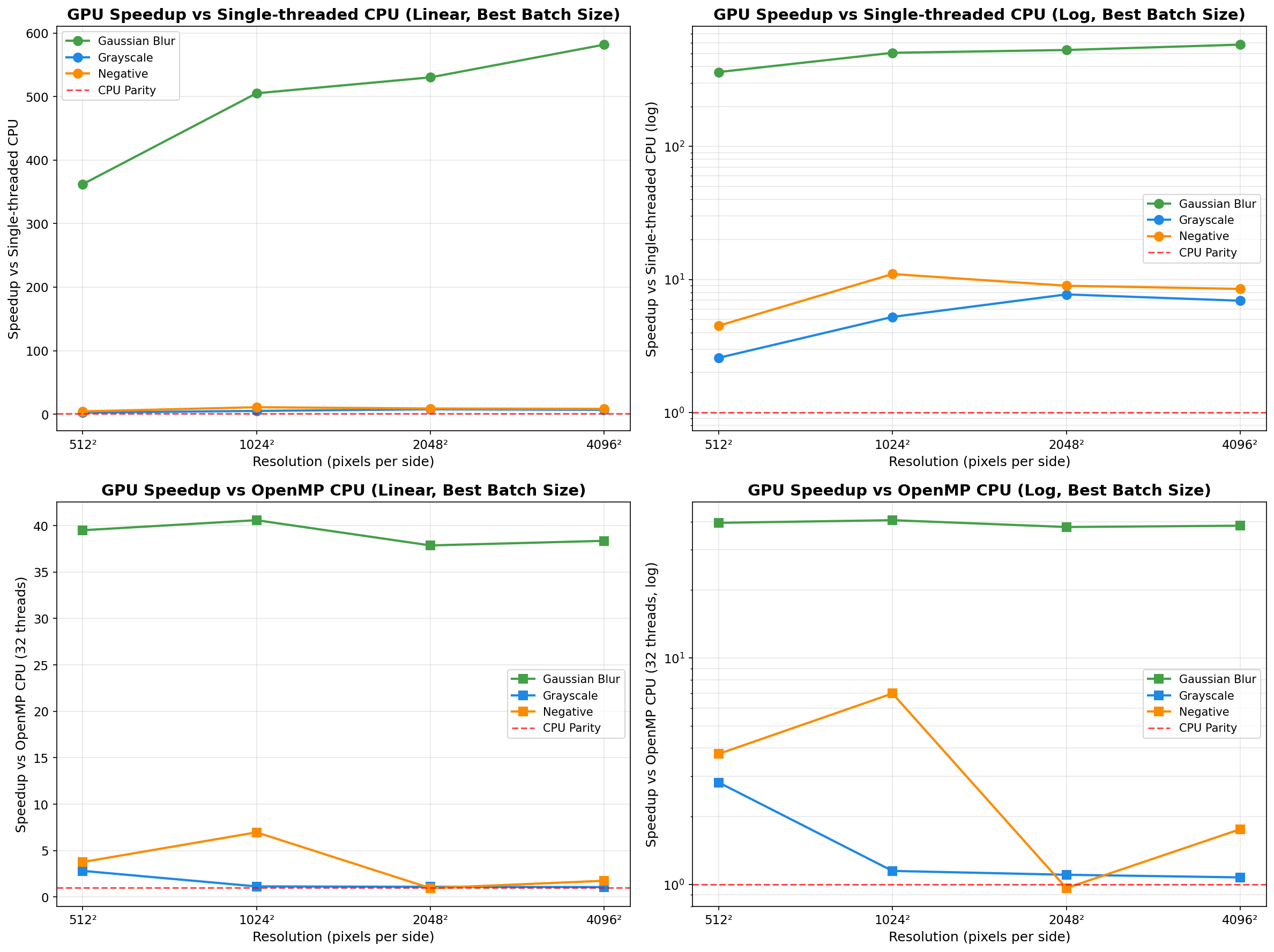
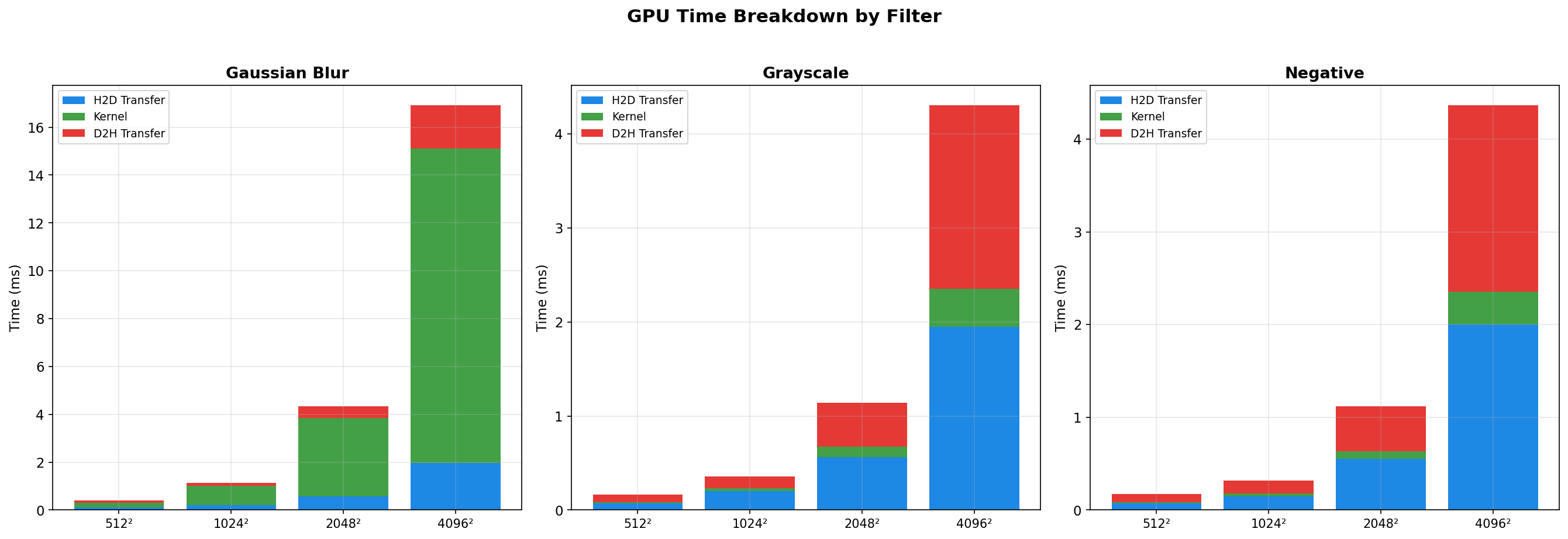
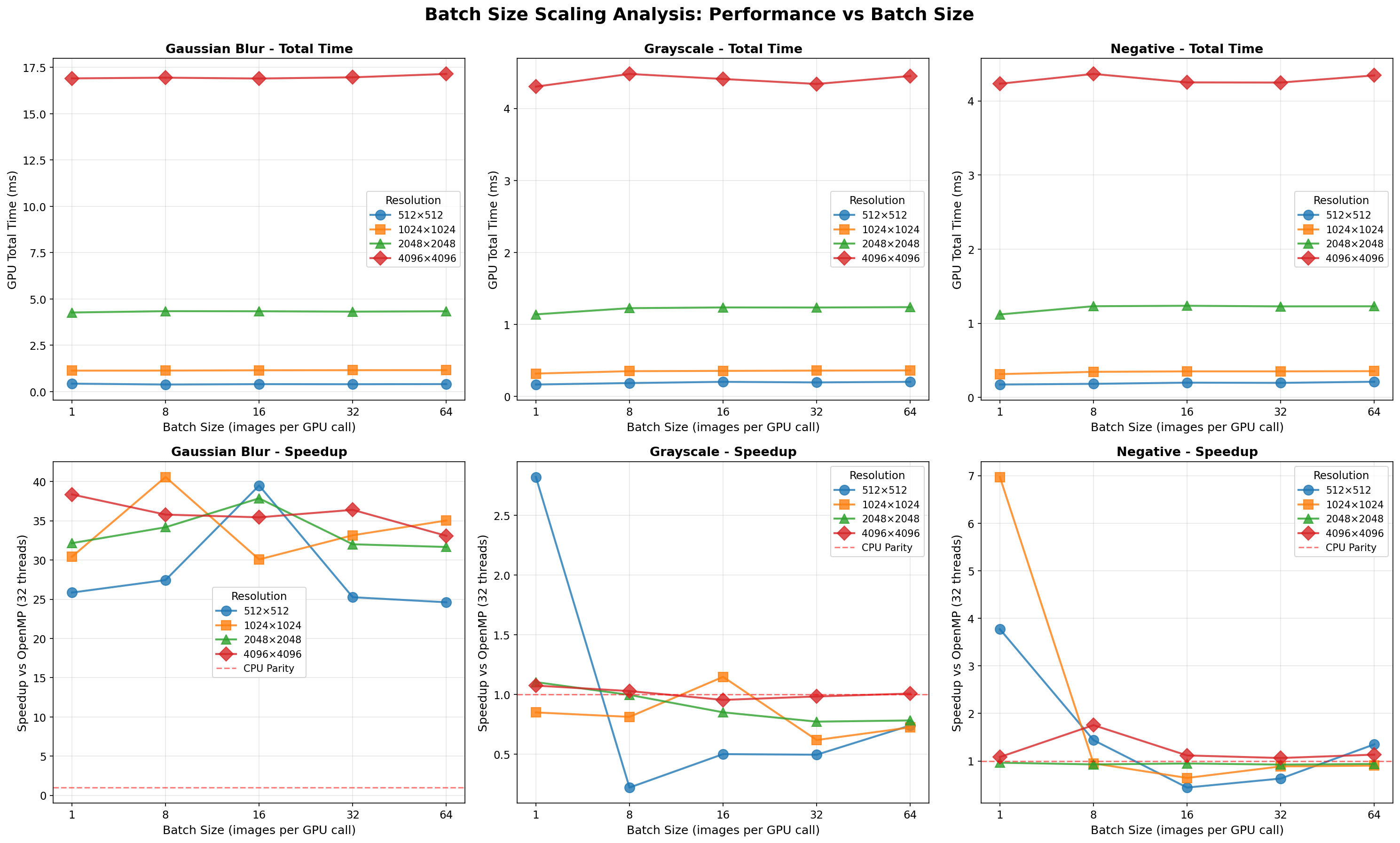
Benchmarks use a synchronous pipeline (H2D → kernel → D2H) across 3 filters, 4 resolutions (512² → 4096²), and 5 batch sizes (1/8/16/32/64).
| Resolution | Batch Size | GPU Time | Kernel Time | Transfer % | Speedup vs OpenMP | Speedup vs CPU |
|---|---|---|---|---|---|---|
| 512² | 1 | 0.426 ms | 0.217 ms | 49.0% | 25.85× | 358.29× |
| 512² | 8 | 0.381 ms | 0.204 ms | 46.5% | 27.45× | 385.88× |
| 512² | 16 | 0.400 ms | 0.202 ms | 49.5% | 39.50× | 361.94× |
| 512² | 32 | 0.396 ms | 0.202 ms | 49.0% | 25.26× | 352.83× |
| 512² | 64 | 0.403 ms | 0.204 ms | 49.4% | 24.62× | 363.66× |
| 1024² | 1 | 1.129 ms | 0.824 ms | 27.0% | 30.42× | 501.63× |
| 1024² | 8 | 1.133 ms | 0.808 ms | 28.7% | 40.59× | 505.09× |
| 1024² | 16 | 1.149 ms | 0.821 ms | 28.5% | 30.08× | 495.33× |
| 1024² | 32 | 1.154 ms | 0.820 ms | 29.0% | 33.16× | 494.37× |
| 1024² | 64 | 1.156 ms | 0.823 ms | 28.8% | 35.04× | 498.23× |
| 2048² | 1 | 4.269 ms | 3.217 ms | 24.7% | 32.15× | 529.63× |
| 2048² | 8 | 4.340 ms | 3.295 ms | 24.1% | 34.18× | 531.13× |
| 2048² | 16 | 4.335 ms | 3.279 ms | 24.4% | 37.87× | 530.14× |
| 2048² | 32 | 4.315 ms | 3.285 ms | 23.9% | 32.01× | 520.04× |
| 2048² | 64 | 4.335 ms | 3.301 ms | 23.9% | 31.66× | 529.82× |
| 4096² | 1 | 16.910 ms | 13.139 ms | 22.3% | 38.36× | 581.63× |
| 4096² | 8 | 16.947 ms | 13.133 ms | 22.5% | 35.79× | 579.58× |
| 4096² | 16 | 16.902 ms | 13.145 ms | 22.2% | 35.44× | 576.04× |
| 4096² | 32 | 16.967 ms | 13.212 ms | 22.1% | 36.40× | 575.91× |
| 4096² | 64 | 17.149 ms | 13.370 ms | 22.0% | 33.09× | 572.22× |
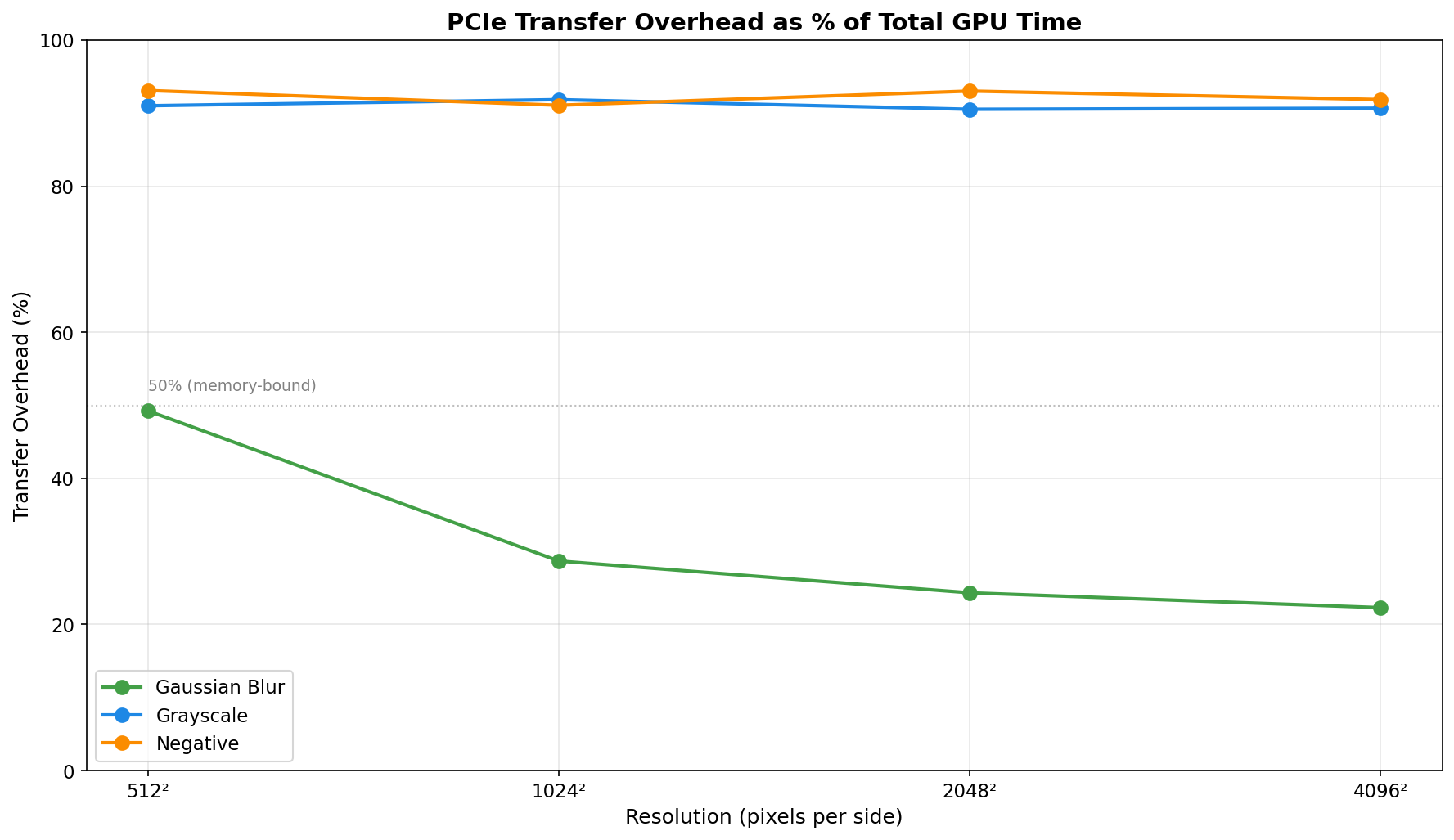
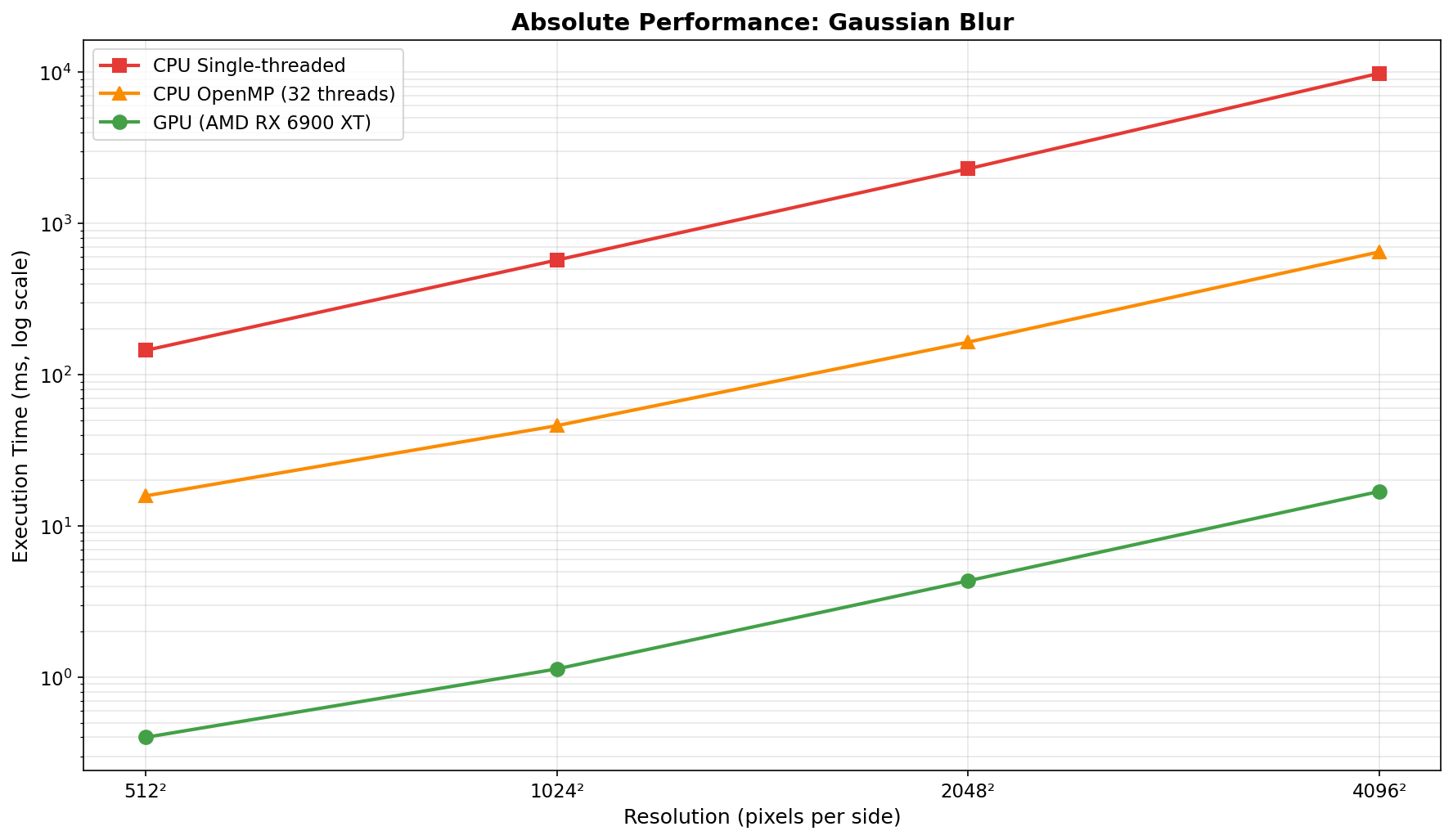
Analysis: Gaussian blur is the ideal GPU workload. The 11×11 convolution kernel (121 operations per pixel) provides sufficient compute intensity to amortize transfer costs. Transfer overhead decreases from ~49% to ~22% as resolution increases. Speedup remains excellent (25-41× vs OpenMP) across all tested resolutions and batch sizes, with peak performance at 1024² (batch 8: 40.6× vs OpenMP, 505× vs single-thread CPU).
| Resolution | Batch Size | GPU Time | Kernel Time | Transfer % | Speedup vs OpenMP | Speedup vs CPU |
|---|---|---|---|---|---|---|
| 512² | 1 | 0.167 ms | 0.014 ms | 91.6% | 2.82× | 2.58× |
| 512² | 8 | 0.187 ms | 0.008 ms | 95.7% | 0.22× | 4.06× |
| 512² | 16 | 0.204 ms | 0.007 ms | 96.6% | 0.50× | 2.76× |
| 512² | 32 | 0.196 ms | 0.006 ms | 96.9% | 0.50× | 2.34× |
| 512² | 64 | 0.204 ms | 0.007 ms | 96.6% | 0.74× | 2.09× |
| 1024² | 1 | 0.319 ms | 0.036 ms | 88.7% | 0.85× | 10.36× |
| 1024² | 8 | 0.352 ms | 0.025 ms | 92.9% | 0.81× | 5.42× |
| 1024² | 16 | 0.356 ms | 0.029 ms | 91.9% | 1.15× | 5.24× |
| 1024² | 32 | 0.360 ms | 0.031 ms | 91.4% | 0.62× | 5.30× |
| 1024² | 64 | 0.363 ms | 0.031 ms | 91.5% | 0.72× | 4.90× |
| 2048² | 1 | 1.141 ms | 0.108 ms | 90.5% | 1.10× | 7.73× |
| 2048² | 8 | 1.227 ms | 0.123 ms | 90.0% | 1.00× | 6.15× |
| 2048² | 16 | 1.237 ms | 0.122 ms | 90.1% | 0.85× | 5.90× |
| 2048² | 32 | 1.236 ms | 0.122 ms | 90.1% | 0.77× | 5.85× |
| 2048² | 64 | 1.241 ms | 0.123 ms | 90.1% | 0.78× | 6.13× |
| 4096² | 1 | 4.303 ms | 0.401 ms | 90.7% | 1.07× | 6.93× |
| 4096² | 8 | 4.479 ms | 0.487 ms | 89.1% | 1.03× | 6.60× |
| 4096² | 16 | 4.409 ms | 0.484 ms | 89.0% | 0.95× | 6.56× |
| 4096² | 32 | 4.340 ms | 0.483 ms | 88.9% | 0.98× | 6.63× |
| 4096² | 64 | 4.450 ms | 0.491 ms | 89.0% | 1.01× | 6.62× |
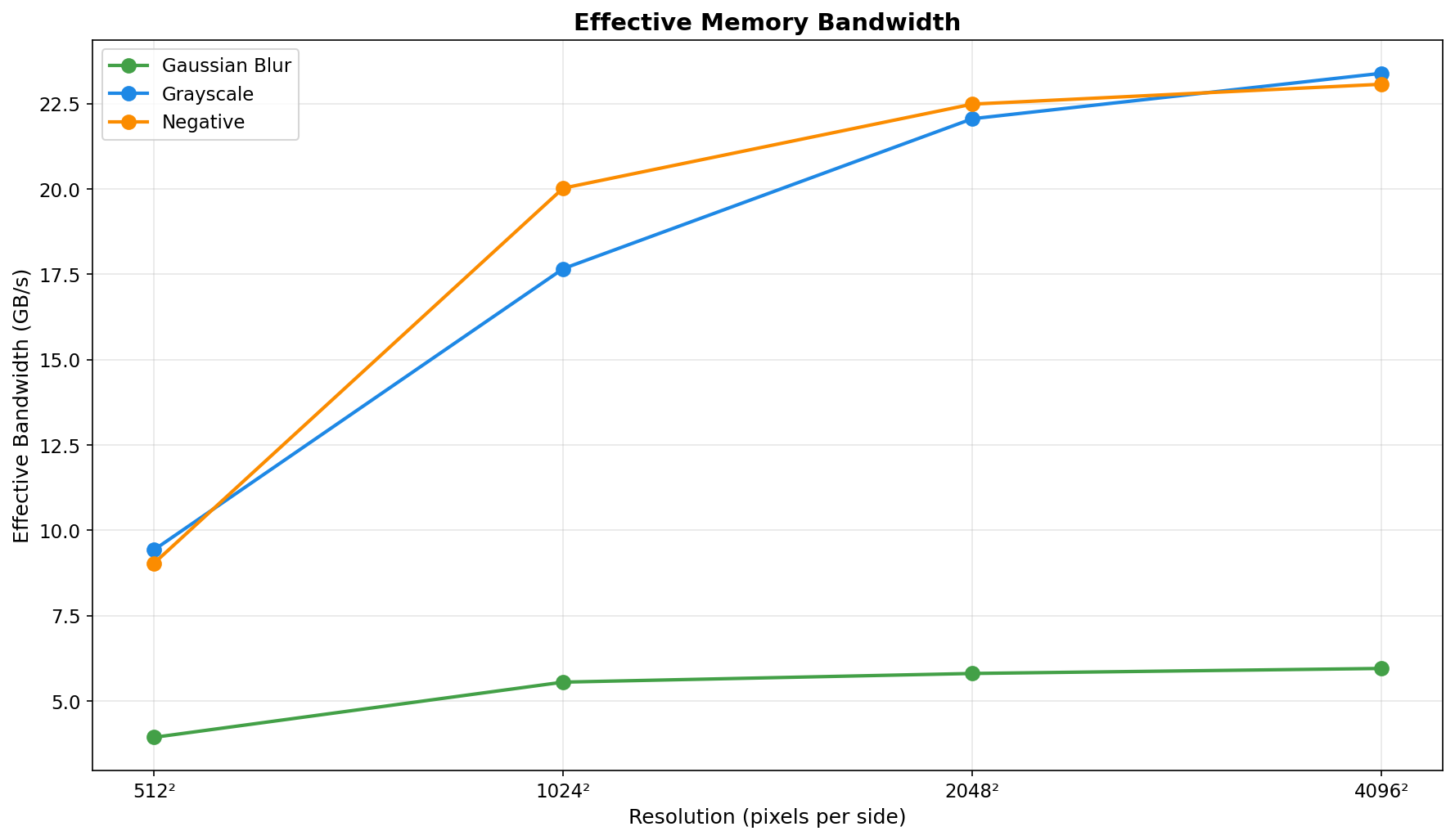
Analysis: Grayscale conversion is severely memory-bound. Kernel execution stays under ~0.49ms even for 4096² images, while transfers dominate (typically 89-97% overhead). Performance is inconsistent across batch sizes, with many configurations showing CPU OpenMP beating GPU (speedup < 1×). Best case: 2.82× vs OpenMP at 512² batch 1. Worst case: 0.22× at 512² batch 8.
| Resolution | Batch Size | GPU Time | Kernel Time | Transfer % | Speedup vs OpenMP | Speedup vs CPU |
|---|---|---|---|---|---|---|
| 512² | 1 | 0.174 ms | 0.013 ms | 92.5% | 3.77× | 4.50× |
| 512² | 8 | 0.183 ms | 0.006 ms | 96.7% | 1.44× | 4.31× |
| 512² | 16 | 0.199 ms | 0.005 ms | 97.5% | 0.44× | 3.99× |
| 512² | 32 | 0.196 ms | 0.005 ms | 97.4% | 0.63× | 2.83× |
| 512² | 64 | 0.211 ms | 0.005 ms | 97.6% | 1.35× | 2.75× |
| 1024² | 1 | 0.314 ms | 0.029 ms | 90.8% | 6.97× | 10.99× |
| 1024² | 8 | 0.345 ms | 0.018 ms | 94.8% | 0.95× | 7.29× |
| 1024² | 16 | 0.351 ms | 0.021 ms | 94.0% | 0.64× | 6.58× |
| 1024² | 32 | 0.351 ms | 0.021 ms | 94.0% | 0.89× | 6.44× |
| 1024² | 64 | 0.354 ms | 0.021 ms | 94.1% | 0.90× | 6.34× |
| 2048² | 1 | 1.119 ms | 0.078 ms | 93.0% | 0.96× | 8.97× |
| 2048² | 8 | 1.230 ms | 0.087 ms | 92.9% | 0.93× | 7.52× |
| 2048² | 16 | 1.236 ms | 0.090 ms | 92.7% | 0.95× | 7.41× |
| 2048² | 32 | 1.228 ms | 0.090 ms | 92.7% | 0.93× | 7.21× |
| 2048² | 64 | 1.229 ms | 0.091 ms | 92.6% | 0.94× | 7.38× |
| 4096² | 1 | 4.231 ms | 0.297 ms | 93.0% | 1.08× | 8.55× |
| 4096² | 8 | 4.363 ms | 0.355 ms | 91.9% | 1.75× | 8.50× |
| 4096² | 16 | 4.249 ms | 0.356 ms | 91.6% | 1.12× | 8.30× |
| 4096² | 32 | 4.247 ms | 0.357 ms | 91.6% | 1.06× | 8.35× |
| 4096² | 64 | 4.343 ms | 0.363 ms | 91.6% | 1.13× | 8.19× |
Analysis: Similar to grayscale, negative inversion is memory-bound with ~91-98% transfer overhead. The simple per-byte operation executes in well under 0.36ms even at 4096², so transfer dominates. Performance is frequently near parity with CPU OpenMP; best case: 6.97× at 1024² batch 1. Worst case: 0.44× at 512² batch 16.
Compute-Bound vs Memory-Bound Performance
Gaussian blur (O(n² × kernel_size²)) demonstrates when GPU acceleration excels: sufficient compute intensity to amortize transfer costs, achieving 25-41× vs OpenMP and up to 582× vs single-thread CPU. Grayscale and negative reveal the limitation: simple per-pixel operations (0.22-6.97× vs OpenMP) where PCIe transfers consume 89-98% of GPU time.
Batch Processing Impact
Extensive testing across 5 batch sizes (1/8/16/32/64) reveals:
Resolution Scaling
As resolution increases, kernel execution grows quadratically while transfer overhead (as percentage) decreases. This makes GPU acceleration increasingly attractive for larger images, particularly for compute-intensive operations. At 4096², even memory-bound filters show 6-9× speedup vs single-thread CPU, though they remain slower than OpenMP.
Autotuning System
The production-ready autotuning framework demonstrates that kernel configuration matters: empirical testing shows 12-18% performance gains over fixed defaults. The three-tier caching system (thread-local → persistent JSON → benchmarking) ensures optimal performance with zero overhead after first run.
This project demonstrates:
HIP Fundamentals
hipLaunchKernelGGL)hipMalloc, hipMemcpy)hipEventRecord, hipEventElapsedTime)GPU Performance Engineering
Production Engineering Practices
Separable Gaussian Blur (3-5× speedup expected)
Tile-Based Processing with Shared Memory
Multi-GPU Support
Half-Precision (FP16) Kernels
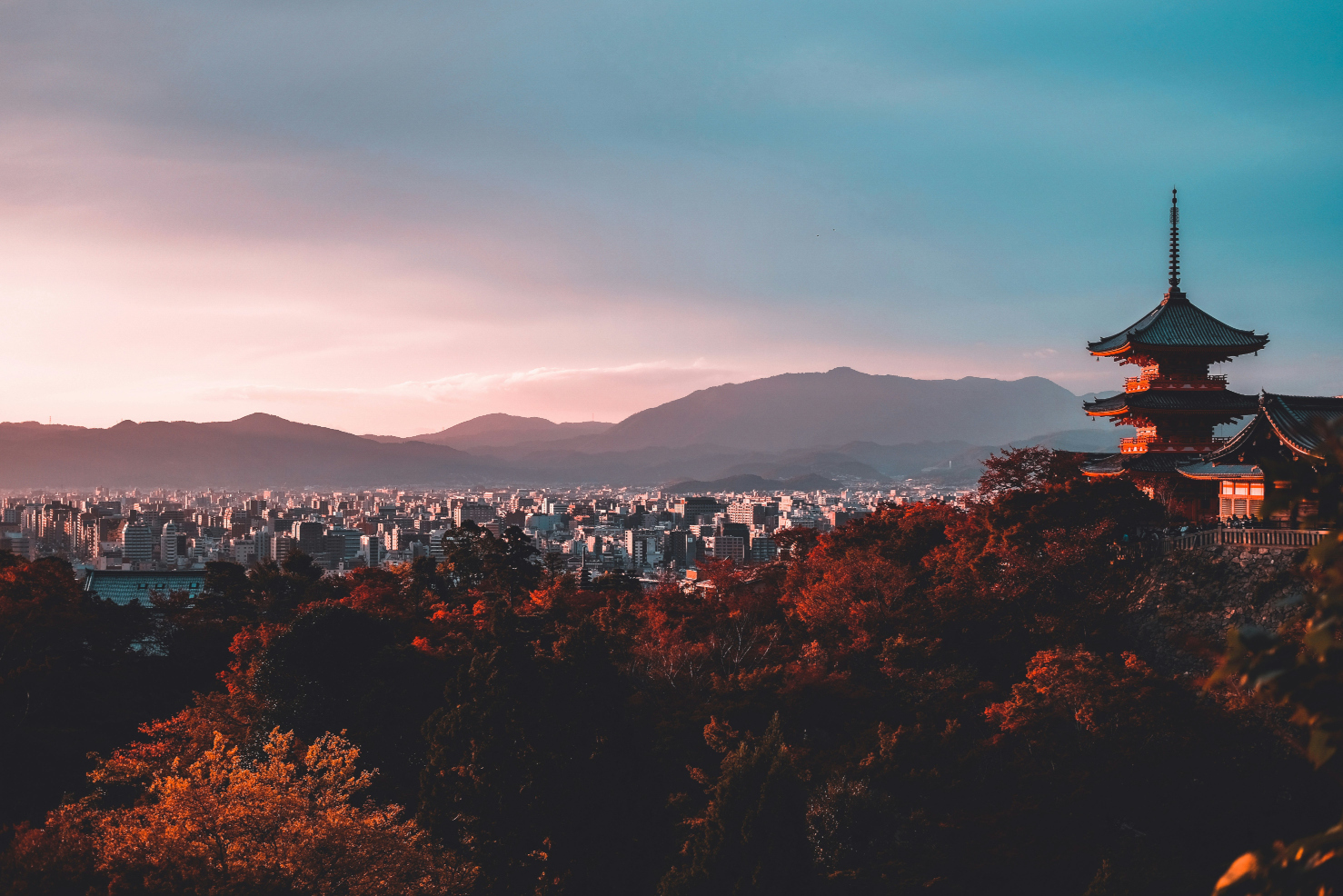
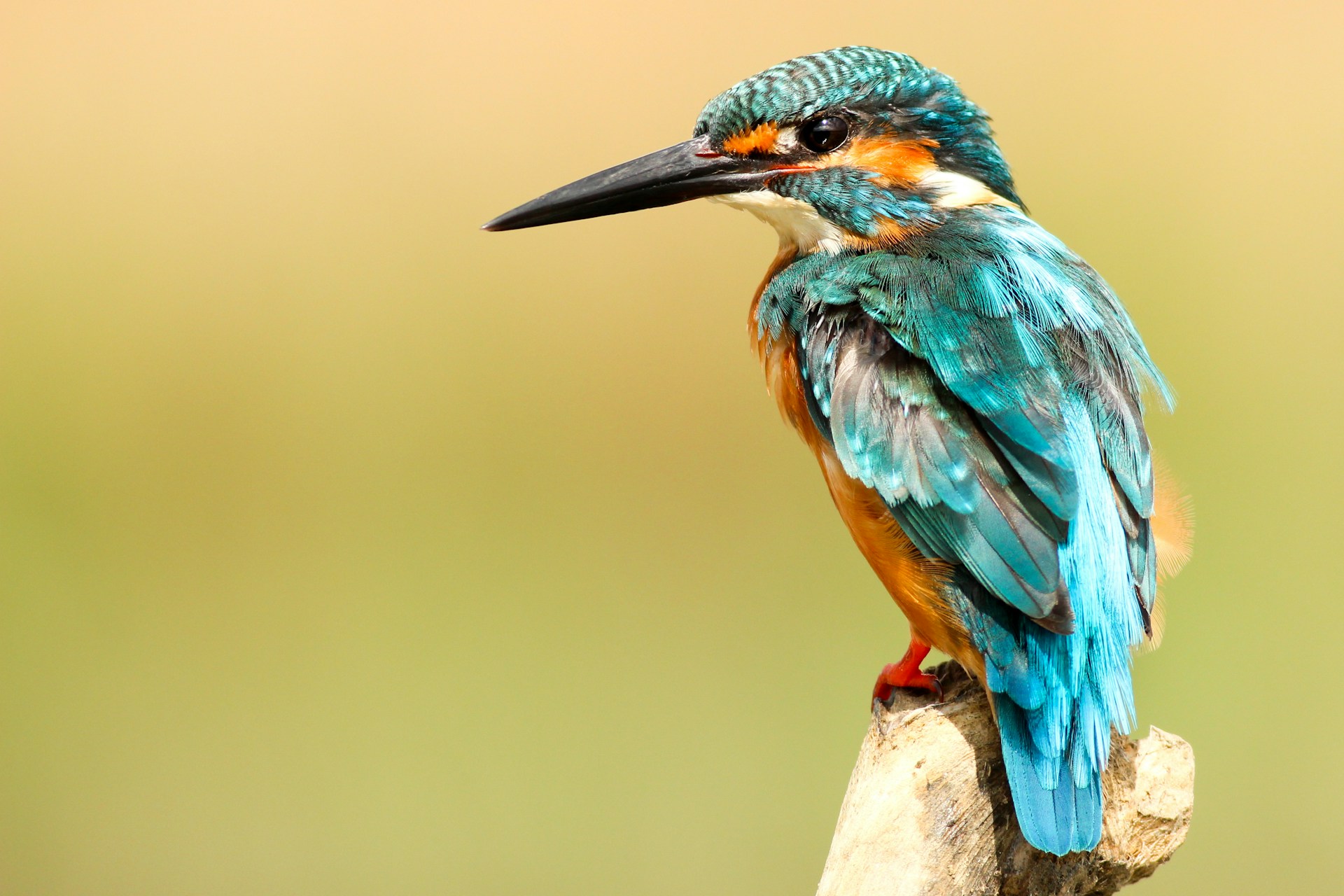
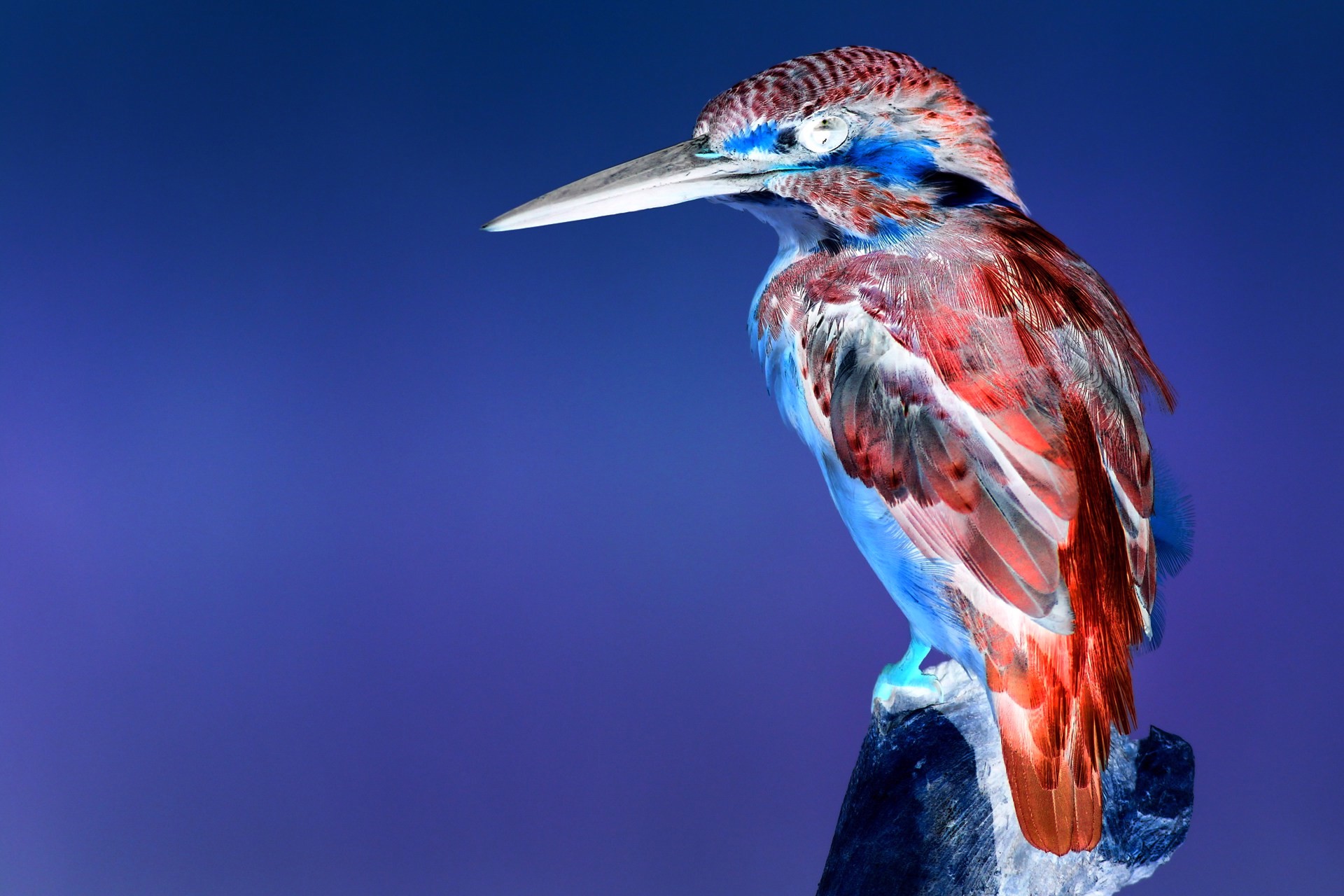
Example images (unsplash.com):